
The interface of the processes
The interface package (src/library/modus/interface) is the shared logic of the interface of the processes: the draw records, the damage, the layout, the input and focus, and the text. The system draws in software, and this logic is still a foundation of its own. The package takes ideas from gui_toolkit and none of its code (section 11).
The terms of this document are in Glossary: interface package, draw record, draw table, element, element identity, damage by difference, interface state, action bar, keycap.
The idea in plain words. A process describes its window again at each frame, as a table of draw records of one size. The package compares that table with the table of the frame before, record by record, and draws only the rectangles that changed. So a process keeps no tree of widgets, and a tool can read, compare or record the table of any frame.
For whom. A reader who writes a window, and a reader who changes src/library/modus/interface or the compositor.
Read before. The design rules for the look; The text of the system: a vector font with subpixel bands for the text.
The map of this document. Section 1: what the processes drew before. Section 2: the model, the draw records and the damage. Sections 3 to 6: layout, input and focus, text, the output. Sections 7 and 8: where the package lives, and property 20 in the compositor. Section 9: the vector font. Sections 10 to 12: decisions, what came from gui_toolkit, and the state of the conversions.
1. What the processes drew before the package
Before the package, each process drew its window by hand with src/library/modus/graphics, and repeated the same cards, bars and tables. This section counts that repetition: it is the reason for the package. The counts are those of the day before the package; section 12 gives the state after the conversions.
Counted on 2026-11-11 (master cbe3c0e) with grep over the folders of the modules (then one folder, now in the module groups of src/modules/) and src/library/modus/:
| Fact | Count |
|---|---|
Modules that draw with src/library/modus/graphics | 34, with 13 995 lines in all |
Lines that call a drawing function (fill, text, block, unsigned, character, ...) | 591 |
| Modules that draw a card or a band of a card by hand | 21 |
Private copies of the procedure card (frame, accent bar, title, caption) | 5: the boot display, the compositor, remote, scheduler, server |
| Private copies of large text (each pixel of the font as a square) | 5: large in remote, scheduler, terminal; write_large in the boot display and server |
| Modules that draw a bar on a track | 15 |
| Modules that draw a table (a header, columns, bands) | 8 |
| Lists with a choice | 3: the menus and the palette of the compositor, manual, errors |
| Text inputs with a caret | 2: the palette, terminal (console draws through the terminal) |
| Modules that react to the pointer | 7; to the keys: 9. Each one tests rectangles by hand |
| Modules that track damage | 1: the compositor. Each other process draws its whole surface for each change, and Present damages the whole surface |
The developer tool inspect is not in this count. It drew a list with a filter and a choice, a band, tables and a hex view, all by hand (section 12 has its conversion).
Without the package, each card, bar, table and list is drawn again in each process, with its own numbers of pixels. A change of the rules (for example the close button, or the colors of the rules) then touches each process.
2. The model: an immediate pass over flat tables
Choice: immediate mode. Each frame, the process describes its whole window again, in code: card, label_value_line, bar, button. Each call appends fixed-size draw records to a draw table that the process owns, and gives back what the input did to that element ("pressed", "has the focus", "the text changed"). There is no tree of objects that lives between frames, no callback, no allocation.
Why, against a retained tree of widgets:
- The state of a window is the state of the process. A retained tree is a second copy of it that must be kept in step, which is the source of most interface faults. In immediate mode, a window cannot show a value that the process does not have.
- The output is data: a table of records of one size, in the memory of the caller (P14). A table can be compared, measured, sent to another rasterizer, or written to a file to test it.
- A retained tree gives damage for free: a node that changed knows its rectangle. Immediate mode loses that. Section 2.2 gives it back without a tree.
2.1 Draw record
The draw table is the one 2D interface of the system (Kernel properties: One 2D interface: the draw table). The form of a record is the contract package src/library/modus/contract/draw_record: the interface package writes the records, and the drawing module and the compositor read them. The design and the forms that come next are in The draw table: the 2D interface of the system in the repository.
A draw record is 48 bytes, little-endian: a header of 24 bytes, then 24 bytes that belong to its kind. The header holds the word of the kind, three reserved bytes, the element identity and the box. The box is four edges in 1/64 pixel (draw_record.UNITS_PER_PIXEL): left, top, right and bottom, where the right column and the bottom line are not in the box. The record draws no pixel outside its box, and the box is its damage. The 24 bytes of the fields are one of the layouts below; each byte that the kind does not name is 0.
| Kind | Value | Fields |
|---|---|---|
None | 0 | None: the record draws nothing. The record of zeros is a None |
Rectangle | 1 | The color of the box, with alpha, in a box that can start and end inside a pixel; or a pattern of that color, in a box on whole pixels: one cell placed on the surface, its size and the steps across and down, cut to the box |
Text | 4 | A run of text in one font: its range in the text table, its color with alpha, its origin in 1/64 pixel at the top of the box, its font (Font_Kind: Cells_8x16 0, Interface 1), its weight and its text size: the height of its line in 1/64 logical pixel, from 4 to 128 logical pixels (TEXT_SIZE_MINIMUM, TEXT_SIZE_LIMIT). In the font of the cells the origin is the left edge of the box, on a whole pixel; in the interface font it is on a third of a pixel, the ink margin right of the left edge, and the text has at most 256 bytes |
Picture | 8 | Its picture memory, its format (Picture_Format: Opaque 0, each pixel 0x00RRGGBB copied; Straight_Alpha 1, each pixel 0xAARRGGBB blended), its first pixel, its stride and its generation; its size is the size of the box |
Text_Grid | 9 | The range of its cells in the text table, its columns and its text size: a cell is half the size wide, a half up, and two widths high |
Gradient | 12 | Two points in 1/64 pixel of the surface and the color at each, with alpha: the box goes from one color to the other along the line of the two points, in a box that can start and end inside a pixel |
Path | 13 | The range of its points in the text table, a fill color and a stroke color with alpha, and the width of the stroke in 1/64 pixel (1 unit to 64 pixels, 0 with no stroke): lines and quadratic curves, filled by the nonzero rule, then stroked with butt ends and bevel joins, with antialiased edges, cut to a box on whole pixels (section 2.5) |
Clip_Push | 14 | None: the records after it, until its Clip_Pop, are cut to its box and to each clip open before it. The box is on whole pixels |
Clip_Pop | 15 | None, and a box of 0: the records after it are cut as before the last push open |
A color of a record is a Draw_Color: 0xAARRGGBB with straight alpha. Alpha 255 is opaque, and the color 0 is transparent. A writer makes one from a color token: draw_record.opaque(token), or draw_record.with_alpha(token, alpha).
- One blending rule. At each pixel that a record reaches, its color goes over the pixel by source over, in linear light with a gamma of 2: for each channel,
result = sqrt((d * d * (255 - a) + c * c * a) / 255), withdthe pixel,cthe color andaits alpha. It is the blend of the glyphs (The text of the system: a vector font with subpixel bands: The blend in linear light), with the alpha as the coverage of the three channels. Alpha 255 writes the color, so an opaque record draws the pixels of a fill.graphics.blend_fillandgraphics.blend_copydraw by this rule, in an SSE2 form and a scalar form that give the same bytes (Vector forms: SSE2). - A gradient along any line. The level of a pixel is the projection of its center on the line of the two points, cut to the two ends, in steps of 1/255: 255 times the projection over the length, rounded down (
draw_record.gradient_level). The two colors mix at that level in encoded values, alpha too, asgraphics.mixmixes the channels; then each pixel blends by the rule. The channels of an end with alpha 0 color the mix, so a fade from a color to the same color with alpha 0 keeps its color.draw_vertical_gradientanddraw_horizontal_gradientwrite aGradientwhose points are the centers of the first and the last line or column, so the line r of h has the level r × 255 / (h − 1); a box of one line or column is aRectangleof the first color. A gradient down draws the pixels of the vertical gradient of version 14. A gradient across differs from the horizontal gradient of version 14 by at most 2 in a channel, which an exhaustive host test proves for every width from 2 to 2048: the old kind stepped each channel in fixed point with one rounding, and the steps of 1/255 round twice. An opaque gradient across computes its row of colors once and copies it into each line. A gradient whose first and last line or column are more thanGRADIENT_SPAN_LIMITpixels apart is not written, and setsrefused.draw_gradienttakes any two points and a box in 1/64 pixel. The two points differ and are at mostGRADIENT_SPAN_LIMIT(32 768) pixels apart on each axis, so each product of the level fits 64 bits. - Edges inside a pixel. A
Rectanglewith no pattern and aGradientcan have a box whose edges are not whole pixels (draw_rectangle_in_units,draw_gradient). The part of a pixel inside the box, the product of the parts on each axis in 1/64 of a pixel, scales the alpha of that pixel:(alpha × covered_x × covered_y + 2048) >> 12. A pixel covered whole keeps its alpha, so a box on whole pixels draws the pixels that it drew before. The coverage is the same on each of the at most nine parts of a rectangle (the corners, the sides, the inside), so each part is one blend of one color; the damage of a record is its box grown to the pixels that it touches. Each other kind draws on whole pixels, and aRectanglewith a pattern too. - A text with alpha. The alpha of the color of a text scales the cover of each pixel of its ink, in each of the six ways the text is drawn: the glyphs of a face of cells and its blend tables, the fallback glyphs and the proportional text (the coverage of each channel times the alpha,
graphics.coverage_with_alpha), and Spleen, its enlarged form and the replacement box (each pixel of ink blends once).draw_text_with_alphawrites such a text. - A path blends once. The coverage of each pixel by a path is the exact part of the pixel inside its shape, so a pixel blends one time for the fill and one time for the stroke, whatever the overlaps of its subpaths or of its stroke: a translucent stroke has no darker joins. A pixel covered whole takes the alpha of the color, and a pixel covered
xbyyunits of 1/64 takes the alpha of aRectanglethat covers that part of it. - The pixels of a surface stay opaque: each damage rectangle is painted with the background before the records draw, so a translucent record gives the same pixels in each cut.
draw_record.Draw_Record, 48 bytes: one record of a draw tablekind1 bytereserved3 byteselement4 bytesleft4 bytestop4 bytesright4 bytesbottom4 bytesfields24 bytesdraw_record.Rectangle_Fields, 24 bytes: the fields of a Rectanglecolor4 bytescell_x 4 bytescell_y 4 bytescell_width 2 bytescell_height 2 bytesstep_x 2 bytesstep_y 2 bytesreserved4 bytesdraw_record.Gradient_Fields, 24 bytes: the fields of a Gradientstart_x 4 bytesstart_y 4 bytesend_x 4 bytesend_y 4 bytesstart_color 4 bytesend_color 4 bytesdraw_record.Text_Fields, 24 bytes: the fields of a Textfirst4 bytescount4 bytescolor4 bytesorigin_x 4 bytesfont1 byteweight1 bytesize2 bytesreserved4 bytesdraw_record.Picture_Fields, 24 bytes: the fields of a Picturememory1 byteformat1 bytememory_reserved 2 bytesfirst4 bytesstride4 bytesgeneration4 bytesreserved8 bytesdraw_record.Text_Grid_Fields, 24 bytes: the fields of a Text_Gridfirst4 bytescount4 bytescolumns4 bytessize2 bytesreserved10 bytesreservedcontinueddraw_record.Path_Fields, 24 bytes: the fields of a Pathfirst4 bytescount4 bytesfill_color 4 bytesstroke_color 4 bytesstroke_width 4 bytesreserved4 bytesdraw_record.Path_Point_Record, 12 bytes: one point of a path in the text tablecommand4 bytesx4 bytesy4 bytes- One border.
draw_record.readtakes the one copy of a record that the reader made, and gives aDraw_Primitive, a union with one record type for each kind, or the problem that refuses the record. Past it, each reader switches on the primitive, whole.draw_record.record_ofwrites the record of a primitive, so the kind of a record always matches its fields. The execution and the difference read each record through the border. - What the border refuses, with its
Problem: a word of a kind that names no member (Unknown_Kind); a reserved byte, or a byte that the kind does not name, that is not 0 (Reserved_Not_Zero); a box whose right is left of its left or whose bottom is above its top (Box_Inverted); an edge pastCOORDINATE_LIMIT(Box_Past_Coordinate_Limit); an edge that is not a whole pixel in a kind that draws on whole pixels: each kind but aRectanglewith no pattern and aGradient(Box_Not_On_Whole_Pixels); and a field out of its range (Field_Past_Bound): a color with alpha 0 that is not 0, two ends of a gradient with alpha 0 that are not both 0, two points of a gradient that are equal, pastCOORDINATE_LIMITor more thanGRADIENT_SPAN_LIMITpixels apart on an axis, a path whose range starts off a multiple of 4 or is not a whole count of 2 to 1 024 points (PATH_POINT_LIMIT), a stroke with a color and no width, a width and no color, or a width past 64 pixels (STROKE_WIDTH_LIMIT), a format of a picture that names no member, a text size of a text or of a grid under 4 pixels, 0 too, or past 256 pixels, never clamped, a weight or a font that names no member, a text with an origin left of its box or more than the larger ofINK_MARGIN_LIMIT(16) pixels and one line inside it, a text in the font of the cells with an origin off a whole pixel, a text in the interface font of more than 256 bytes (INTERFACE_TEXT_LIMIT) or with an origin off a third of a pixel, and a pattern of a rectangle out of its bounds (below). The words 2 and 3, of the vertical and the horizontal gradient that became oneGradient, 6 and 7, of the grid of points and the folded gap that left the format, 10, of the kindLinethat became the stroke of aPath, 11, of the kindInterface_Textthat became aTextin the interface font, and 5, of theClipthat replaced the cut and became a push and a pop, name no kind. AClip_Popwhose box is not 0 is refused withReserved_Not_Zero: a pop names no byte of its box. The checks run in that order: a record with two faults gives the problem of the first. A refused record draws nothing; a refusedClip_Pushis an empty clip, and a refusedClip_Popstill ends its push. A record that the border reads is canonical: each unused byte is 0, and a color that draws nothing is 0. So two records with the same bytes draw the same pixels, and the difference compares bytes. Two records with other bytes can still draw the same pixels: a gradient of one line whose second end has alpha 0, which is never drawn; two rectangles of the color 0 with other patterns; a rectangle of the color 0 against aNone. The difference then damages their boxes: the damage is too large, never too small. - What the border does not check: what a record names in the tables of its frame. The range of a text, of a grid and of the points of a path in the text table, and the pixels of a picture in its picture memory, are checked where the table is (
text_of_record,grid_of,path_of,picture_of), in 64 bits with each factor below 2^32. The points of a path have their own border (section 2.5). - Places inside a pixel. Places are in 1/64 pixel. A
Rectanglewith no pattern and aGradientdraw inside a pixel (above), and the points of a path are places inside a pixel. The cells of a pattern and the boxes of the other kinds, a path too, are whole pixels; the origin of a text in the interface font is on a third of a pixel, the positions of the glyph cache. - A rectangle that repeats. A
Rectanglewith both steps at 0 is its box, and its other fields are 0. With both steps above 0 it is a pattern: a cell ofcell_widthbycell_heightat (cell_x+ n ×step_x,cell_y+ m ×step_y) of the surface for each integers n and m, cut to the box. The border refuses one step at 0 and not the other, a size or a place that is not a whole pixel, a cell of no size or larger than its step, a place pastCOORDINATE_LIMIT, and fields of a pattern with both steps at 0. So a pattern reaches each pixel of its box at most once. Cells that touch across or down are one fill, so a pattern whose cell is its step costs one fill, as a solid rectangle; the most calls come from a cell of 1 pixel each 2 pixels, one call for each cell. The pattern is placed on the surface and not on the box: two boxes of one surface, and two damage rectangles, show one pattern, and an element needs no clip to draw a part of it. - The look of the system is elements. The format holds primitives only.
draw_point_grid(andbackground) writes oneRectanglewith the patternPOINT_GRID_PATTERN: a point of 2 pixels at 12 + 24 n of the surface (The design rules: Surfaces), cut to the area.draw_folded_gapwrites two records, each with the box of the gap: the track as aRectangle, then onePathof two subpaths, the two lines from the bottom left up to the right, stroked 1 pixel wide asdraw_linestrokes a line, cut to the box as the lines of the gap always were. A gap with an end of a line pastLINE_END_LIMIThas its track and not that line. - The clip stack.
draw_clip_push(table, x, y, width, height)cuts the records after it to the rectangle and to each clip open before it, until itsdraw_clip_pop(table). A clip inside a clip keeps the outer clip: a nested clip larger than its parent draws no pixel outside the parent, and a list inside a clipped card is cut by both. A width or a height below 1 is an empty clip, under which nothing draws. A clip cuts what the records draw, not where the pointer acts.list_with_choiceandlist_of_rowspush the clip of their area. - The order of the clips. At most 16 clips are open at a time (
CLIP_DEPTH_LIMIT). The order is a fact of the table: the border of the order,draw_record.clip_order_check, refuses a pop with no push open (Pop_Without_Push), a push past 16 (Push_Past_Depth_Limit), and a table that ends with a push open (Push_Without_Pop).execute_draw_table_in_rectangles_20runs it before the first pixel, and refuses such a table withBad_Valueof the argumentnowand the unitRecords: the value is the problem, andfoundthe number from 1 of the record. The writer writes no such table: a push past 16 is not written and setsrefused, the records under a push that is not written are not written either, a pop with no push is not written and setsrefused, each record keeps room for the pops of the clips open, andframe_endpops each clip that a frame left open and setsrefused. The window layer writes the refusal on the log one time, as each refusal of the module. - A table out of order still draws less, never more. The order is the order of the kind words, also for a clip that the border refuses. The execution walks it again with each record: a pop with no push changes nothing, a push past 16 hides each record until its pop, and a push that the border refuses is an empty clip. So a table that changes during the call never draws outside a clip that it pushed.
- Places and sizes: each edge of a record is cut to 2^23 pixels from the corner of the surface (
COORDINATE_LIMIT), then the size is the difference of the two edges. In 1/64 pixel an edge is then inside 2^29, so the difference of two edges, at most 2^30, fits ani32, and so does an edge plus the largest ink margin. A rectangle that covers the surface with places past thei32still covers it. A text whose box would start past the limit has no record, in either font: no surface reaches it. fullandrefused:fullsays that a record, a text or the cells of a grid did not fit in the table. The table is not the frame, so the next frame of that picture is drawn whole.refusedsays that a record could not be made: a picture with a pixel outside each picture memory of the table, a grid whose cells are fewer than its rows, a grid of more than 2^24 cells, a grid in a text table that does not start at an address that is a multiple of 4, a gradient whose span passesGRADIENT_SPAN_LIMIT, a gradient or a rectangle in 1/64 pixel that the border refuses, or a path whose points or stroke the borders refuse, or in a text table that does not start at an address that is a multiple of 4, a push of a clip past 16 open, each record under a push that is not written (past 16, or with no room for its pop: the records under it are not written, so none draws outside the clip that its writer asked for), a pop with no push open, and a frame that left a clip open (its pop is written). That record is missing, and each other record is in the table, so the difference stays exact.- Grids with large numbers:
grid_validdivides in place of a product, so a count of rows or a stride near the largestintcannot wrap and pass the check. - The version (
DRAW_RECORD_VERSION, 17) is in the contract, and in the names of the exports of the drawing module. A change of a kind, of a field, or of a bound that changes what a record draws is a new version. The format changes in place: the package, the drawing module and each writer move together. - The text of a run is in the text table of the draw table, not in the record: a record keeps its size, and two runs with the same bytes compare equal.
- A
Picturerecord shows the pixels of a picture of the caller. The process raises its generation when its pixels change; with the same generation the record compares equal and damages nothing.life,paint,plasma, the portraits ofhall_of_fameand the surfaces of the windows in the compositor are pictures. - A picture names its pixels by values. The draw table holds a list of picture memories (
Draw_Table.picture_memories): each is one run of pixels of the process.draw_picture(table, x, y, canvas, generation)finds the first picture memory that holds each pixel of the canvas, and writes its number, the index of its first pixel and its stride in the record. A canvas with a pixel outside each picture memory is refused.draw_picture_with_alphawrites the same record with the formatStraight_Alpha: each pixel of the canvas is0xAARRGGBB, and blends. In the same way,draw_rectangle_with_alpha,draw_vertical_gradient_with_alpha,draw_horizontal_gradient_with_alpha,draw_gradient,draw_rectangle_in_unitsanddraw_text_with_alphatake draw colors;draw_rectangle, the two gradients anddraw_texttake tokens, which are opaque. The execution checks a record against its memory (picture_of), in 64 bits with each factor below 2^32: a first pixel, a stride or a size that a hostile caller wrote draws nothing when a pixel is past the memory. A record holds no address, so the drawing module draws it (section 7; the design: The Picture record in a description in the repository). - A picture in tiles: a Picture record damages its whole rectangle when its generation changes. A process whose picture changes in one part cuts it in tiles: each tile is a picture of its own over the same pixels (
graphics.view), with its own record and its own generation, and the process raises the generation of the tiles that it drew in. The difference then damages those tiles only. The processheroncuts its stage of 640 by 384 pixels in 240 tiles of 32 by 32, and writes the mean damage of a picture on its log. - A frame is shown whole or not at all. Every surface has two pictures. The process draws the picture that the compositor does not read,
Presentnames the picture that is complete, and the next frame is drawn in the other one. A damage rectangle is painted with the background, then its records are drawn: the compositor never reads between the two. The window layer does this for each process, with no code in the process:window_frame_endwaits until the compositor took the picture before (display.canvas_wait), then draws. The wait is on the count of the records that the compositor read from the ring of the window. Its bound is the hang bound, 60 s: after it the frame is left out, with one line on the log, and the window waits no more until the compositor reads again.- A process that serves other processes in the thread of its window asks
display.canvas_freebefore it builds a frame, and never waits. After a no,display.wait_eventsalso ends when the compositor has read.heron,terminal,manual,remote,server,logandquic_echodo. - A process that draws by hand draws into its hand picture, of the logical size of its window (
interface.Hand_Picture,hand_picture_open), then shows it withhand_picture_show: one Picture record that the drawing module puts on the screen at the scale. A process that draws over the frame of the window layer ends the frame withwindow_frame_end_into_picture, which draws the frame whole into the hand picture, draws over it, then shows it. - The compositor shows a surface after its first
Present, and refuses a surface with memory for less than two pictures. It counts thePresentrecords that named the picture that it already read:pictures_drawn_againincompositor.windows(), 0 for each process of the system. It refuses and counts aPresentwhose picture number is not 0 or 1 (presents_refused). - A process that paces its pictures sends
Picture_Duewith 1 before it waits with a change that it did not draw, and the window layer sends it with 0 after a frame that changed nothing; aPresentends it too (display.picture_due_set). The compositor gives it asdueincompositor.windows(). A machine test takes no picture while a window hasdue1 (Developer tools: When the tool takes a picture). The terminal sends it: it draws at most one picture in each 16 ms, and it sends the due state before each wait of its loop, also for a record that came while it drew its last picture. - In one turn of its loop the compositor takes from the ring of a window the records that the ring holds at the start of the turn, at most the capacity of the ring (
system.records_of_turn): a process that writes records with no end does not hold the compositor. - One thread of a process owns a window:
display.canvas_waitanddisplay.wait_eventsof one window are called from one thread.
- A
Text_Gridrecord shows a grid of text cells of the caller (Text_Grid_Cell: a character, as a code point, reverse, a color; or filled: a character in its color on a cell of a fill color, for a list drawn over text, 16 bytes for each cell).draw_text_gridcopies the cells into the text table. Its 48 bytes do not change when its cells change: the difference compares the cells (section 2.4).
2.2 Damage by difference
The process keeps the draw table of the last frame that it presented (a second table, its own memory). After it builds the table of this frame, damage_by_difference compares the two tables, record by record, at the same index:
- Two records at one index are equal if their 48 bytes are equal, except the first byte of the range of a text, a grid or a path, and the bytes of their texts and of the points of their paths are equal. Nothing is damaged. The equal case is one comparison of the 48 bytes, and of the bytes of a text, with no read through the border: two records with the same bytes draw the same thing, also two refused records, which draw nothing in both frames. Two records whose bytes differ are not read through the border: the border keeps each byte of a record that it reads canonical, so two records whose bytes differ are equal only when they differ in the first byte of a range alone, and the bytes that the ranges name are equal. For a path, the rest by 4 of the first byte and of the address of its points must be equal too: the border refuses a first byte off a multiple of 4, and the execution draws nothing at an address off a multiple of 4, so a path that moves off that place draws other pixels with the same points. A refused record is equal to no record whose bytes differ outside that first byte: both boxes are damaged.
- If they differ, the rectangle of the old record and the rectangle of the new one are damaged: the old one must be painted over, the new one painted.
- The records after the end of the shorter table are damaged.
- The rectangles merge as in the compositor: rectangles that touch become one; with no room left (
DAMAGE_CAPACITY8), a new rectangle joins the first one.
Then execute_in_rectangles draws again, in each damage rectangle, each record of the new table that touches it, cut to the rectangle. The process never tracks damage by hand.
- The limit of the index rule: a record added in the middle of the table moves all the records after it, and they all compare as different: the damage is too large, never too small. It is right, and it costs only time. An element identity in each record (offset 4) allows a later rule that matches records by identity; the package does not use it.
- Two pictures: the picture that the process draws now holds the frame of two frames before. The window layer keeps one table, the table of the last frame that it presented, and for each picture its debt: the rectangles where the picture differs from that table (
Picture_Debts). A frame draws the changed rectangles and the debt of its picture, and presents the changed rectangles and the debt of the picture on the screen (damage_of_picture). After thePresent, the drawn picture has no debt, and the changed rectangles join the debt of the other one (picture_debts_after). The caller gives no table for the second picture. A frame equal to the last table draws and presents nothing. Host testtwo_pictures_screen_is_each_frame: 400 frames of a terminal, with frames that repeat, lost presents and new fonts; after each one the screen is the frame drawn whole. - A picture that is not known (the first frame of each picture, no last table, a last table that was full) is drawn whole. When the picture on the screen is not known, the screen can show records of an older frame where the frame now draws nothing: the present is the whole surface (host test
two_pictures_unknown_shown_picture_presents_all). - A new font: on
Settings_Changed, each record stays the same and each pixel of text changes.window_eventscallsdraw_whole_window_next, which makes the next frame of each picture whole. The terminal and the manual read their events by themselves and call it. - A new size: on
Resized,window_eventsmakes the surface of the new size (display.surface_resize) and callsdraw_whole_window_next: no picture of the new surface is known. - A present that is lost:
display.present_rectanglegives false when the command ring is full. The canvas stays the same picture, which is then not the last table: its next frame is whole. - A frame that is left out: the compositor did not take the picture before within the bound. Nothing is drawn and no state changes: the next frame is compared with the last frame that was presented.
window_eventsthen says that an event came when the canvas is free again. - Present with a rectangle:
display.present_rectanglegives the compositor the union of the damage: the compositor draws again only that part of the window. A full rectangle stays the default ofdisplay.present. - The key that a picture shows: the compositor gives each key with a character a serial (
Event.key_serial). A process whose picture shows the key callsdisplay.key_shownwith it, and eachPresentnames the newest such serial; the compositor then measures the time from the input service to the flip of that picture. The console names the keys of its line, through its terminal (terminal.edit); a process that names none is never measured (From the desktop of today to a light web browser: The three measures on the path of the system in the repository). - The cost, measured by the process
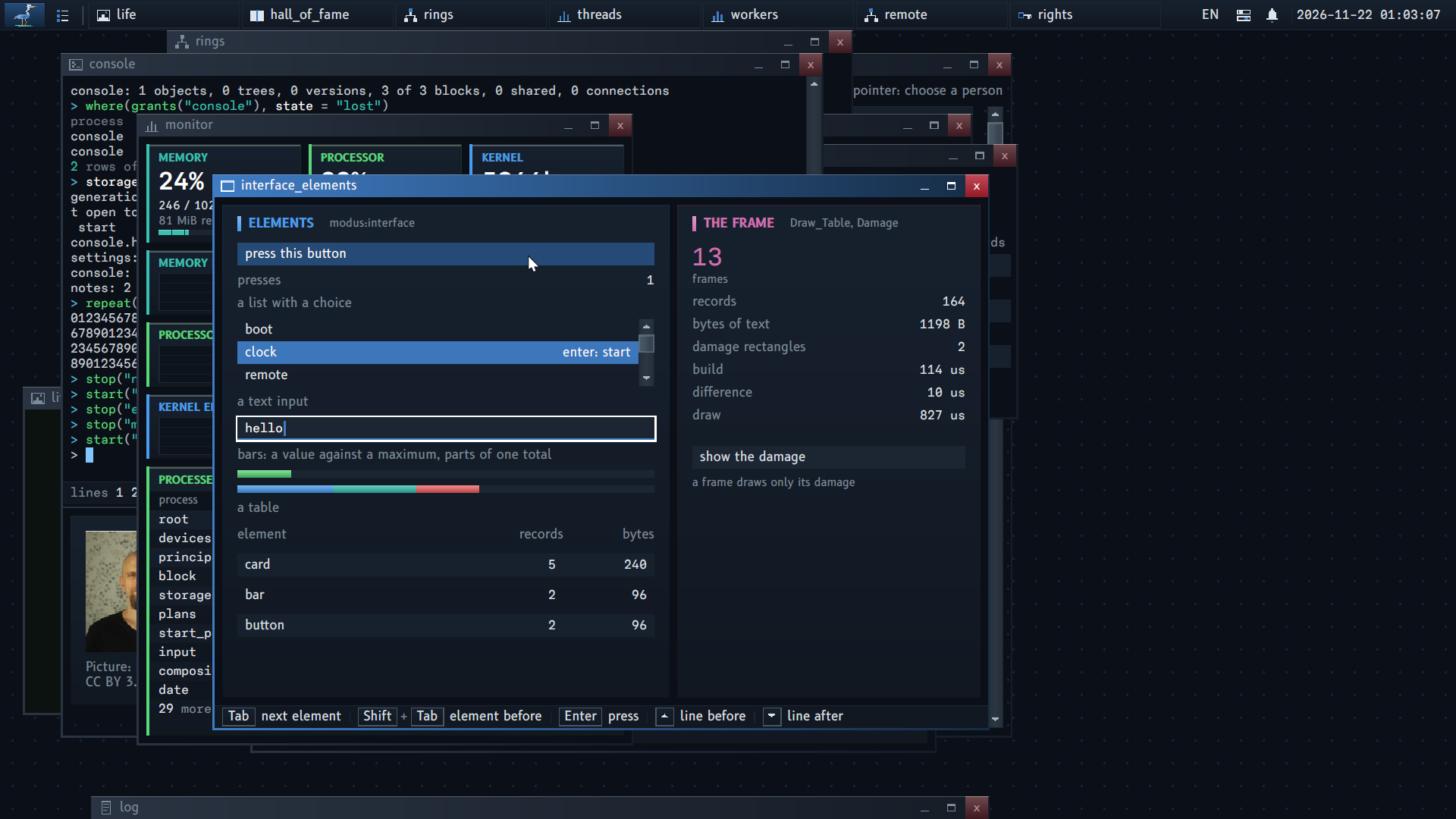
interface_elementson its window of 121 records, the mean of 100 rounds, on a test machine whose host was loaded: nothing changed, 0 rectangles in 2.4 us; one number changed, 3 rectangles in 2.9 us; everything moved, 1 rectangle in 4.4 us. On the host, on one core, with a table of 121 records, the difference takes 1.7 us when nothing changed and 3.6 us when everything moved, against 2.2 us and 4.4 us with the record of version 10: the one copy of a record is six loads of 64 bits (draw_record.copy_once), and two records are compared as words. The whole frame is drawn in about 500 us on the same loaded machine.clockdraws one picture in 93.6 us there.
2.3 Memory of the caller, errors as values
- The caller gives the draw table (
records: []Draw_Record,text: []u8) and the interface state. The package never allocates. Its core files make no kernel call;window_drawing.odinreads the events of a window and presents its surface. - The window memory (
Window_Memory(RECORDS, TEXT), a record of the process) holds the drawing of one window and the memory of its two draw tables:RECORDSrecords andTEXTbytes of text in each.TEXTis a multiple of 4, so each text table can hold a grid. A frame starts withwindow_frame_start(&window_memory, window): it gives the drawing its tables, then callswindow_frame_begin. The window is not optional: the frame takes the scale of its surface from it, and the compositor gives each pointer event in logical pixels, so a frame with no scale draws each element away from the place where a press reaches it. It draws no background, because the draw of each rectangle starts from the background color; a window with the grid of points callsbackground. The drawing iswindow_memory.drawing: the events, the end of the frame and the measures take it.
window_memory: interface.Window_Memory(512, 8192)

frame := interface.window_frame_start(&window_memory, window)
// ... the elements of the window ...
interface.window_frame_end(&window_memory.drawing, &frame, window)
- On the surface of a process, each damage rectangle is painted with the background before the records draw again (
draw_damage_on_surface), and a whole frame starts from the background: a record that a frame no longer has leaves no pixel, with no rule for the caller. The compositor draws its panels over other windows, so it draws the records only. - A table that is full stops taking records and keeps the flag
full: the frame is drawn without the records that did not fit, the process can test the flag and write it on its log. No element fails in silence. - An element gives its result as a value (
Element_Result): pressed, has the focus, changed. Nothing is hidden in a context.
2.4 Text grid
A text grid is the element of the terminal: up to 192 x 54 cells, which a process changes many times in one second.
draw_text_grid(table, x, y, grid)copies the cells of the caller into the text table of the frame, row after row with no gap, at a place that is a multiple of 4 bytes. The record holds the place, the bytes and the columns: values only, so the drawing module draws a grid (section 7). The table before keeps the cells in its copy of the text table (draw_table_copy). A full grid of the terminal is 192 x 54 cells of 16 bytes, 165,888 bytes, in each text table.- A text table with a grid starts at an address that is a multiple of 4, as the colors of a cell: the terminal declares its text tables as arrays of 32-bit words.
grid_ofchecks a record against its text table, and a record whose cells are not there draws nothing and is damaged whole. - The difference compares two grid records whose bytes are equal except their places in the text tables, then damages, in each row, the span from the first changed cell to the last one; the rectangles merge as in section 2.2. A grid that changes its size is damaged whole.
- A frame shows the cells at the moment of
draw_text_grid: a thread that changes the cells after it changes the next frame only. - The execution draws the cells of one color that follow each other as one text, so the text goes through
graphics.text_sized, at the text size of the grid, once for each run. - The console draws no pixels: it writes records into its terminal, so the text grid of the terminal is the drawing of the console too.
2.5 Path and line
A Path record draws lines and quadratic curves from a list of points: draw_path(table, points, fill, stroke, stroke_width), with each place in 1/64 pixel of the surface. The design is The draw table: the 2D interface of the system: The kinds in the repository.
- The points are in the text table, 12 bytes each (
Path_Point_Record): the word of aPath_Command, then x and y.Move(1) starts a subpath,Line(2) adds a segment to the point,Curve_Control(3) is the control point of a quadratic curve whose end is the next point, aLine, andClose(4) closes the subpath with a segment back to itsMove; its x and y are 0. The word 0 names no command. - The border of the points (
draw_record.path_points_read,Path_Problem) loads each point once, and refuses a command that names no member (Unknown_Command), a point pastCOORDINATE_LIMIT(Point_Past_Coordinate_Limit), aClosewhose place is not 0 (Close_Point_Not_Zero), a first point that is not aMove(Not_Started_By_Move), aMovewith no segment after it (Empty_Subpath), aCurve_Controlwith noLineafter it (Curve_Without_End), aClosethat does not follow aLineor that a point other than aMovefollows (Close_Out_Of_Place), and fewer than 2 or more than 1 024 points (Count_Out_Of_Range). A path whose points it refuses draws nothing.draw_pathchecks the points that it writes with the same border, and refuses them withrefused. - The fill covers the inside of each subpath by the nonzero rule; a subpath with no
Closeis closed for the fill. A pixel inside the shape is covered whole, also where two subpaths overlap; a pixel on an edge is covered by the part of it inside the shape. - The stroke covers a band of
stroke_widthalong each segment, with butt ends, and a bevel join between two segments. A subpath that ends with aClosehas the segment back to itsMoveand a join at each of its ends. The stroke is drawn after the fill, in its own color. - A curve is cut into 1 to 16 segments: the fewest that stay within 1/8 pixel of the curve (
draw_record.curve_segment_count). A curve whose control point is far off (a bend past 128 pixels) takes 16 segments, which stay within its bend / 1 024 units of the curve. - The coverage of each pixel is the exact part of the pixel that the shape covers, in integers, the method of the glyphs (The text of the system: a vector font with subpixel bands: Fixed point). So the pixels are the same at each build and in each damage rectangle: the execution draws the cut in bands of 8 rows and 256 columns, and the part of each segment outside a band is cut at the band, not clamped. The memory is on the stack: 12 KiB for the copy of the points, 8 KiB for one band, 1 KiB for one row of colors.
- The box is on whole pixels and cuts the path.
draw_pathmakes it the box of the points, control points too, grown by half the stroke, rounded out. - A line is a path of one segment, stroked:
draw_line(table, from_x, from_y, to_x, to_y, thickness, color). Its two points are the centers of the squares that the line of before drew at its two ends, each moved half the thickness out along the line. So a line across or down covers whole pixels, the pixels of the line of before; a line at an angle has antialiased edges. An even thickness starts one pixel before the point.draw_linewrites the left end first, or the top end when the two ends have one x: a line and its reverse are one record. Its box holds the four corners of its band. - Hostile values:
- A thickness of 0 or less gives no record. A thickness past 64 (
STROKE_WIDTH_LIMIT) is cut to 64. - An end past
LINE_END_LIMIT(COORDINATE_LIMITless 64 pixels) gives no record: a cut end would change the slope, so the record would be another line. - A record written by hand with a stroke of no width, a width with no color, a width past 64 pixels, a count of points out of its bounds, or a first byte that is not a multiple of 4, is refused by the border: no pixel, and its box is its damage.
- A line of length 0 is one square of its thickness. A line fully outside the area is cut away like each record.
- A thickness of 0 or less gives no record. A thickness past 64 (
- The cost bound: each band walks each edge of the outline of the path once, and each edge adds to at most the rows of the band and the columns that it crosses. The count of the edges, with the case of a
Close, is stated in The draw table: the 2D interface of the system: The kinds in the repository. The host testinterface.path_measureprints the cost of a fill and of a stroke when the environment setsMODUS_MEASURE_PATHS; it asserts no time. - Limits: no round joins, no round or square ends, no dashes, no even-odd rule, no cubic curve: each comes when a process needs it (The draw table: the 2D interface of the system: The limits of the format: cost, never look in the repository). Lines at an angle are allowed, sparingly (The design rules: Forms).
draw_outlineappends the border of a rectangle as four rectangles, the same pixels asgraphics.outline.draw_kind_iconappends a kind icon (src/library/modus/kind_icons; The design rules: The icons of the kinds) as rectangles: each cell is a square of the cell size given, 1 pixel in a row of a list, and an icon is at most 20 records.list_of_rowsdraws the icon of each row with it.
2.6 Window places
The compositor puts each window where the principal puts it, to the pixel (src/library/internal/compositor/bar/window_place.odin, procedures with no state and their host test; The design rules: Spacing).
- A window that the pointer drags goes to the point under the pointer, then stays where a
gapof its title (bar.TITLE_KEPT, 8 pixels) is on the screen, under the bar. At the left, the end of the title is at 8 or more, so the close button is on the screen too. Without that bound, a window dragged past an edge could not come back: the menu of the windows only brings a window to the front. - A drag of an edge of a resizable window gives the size that the pointer gives, to the pixel, within the least and the largest size of the window and within the screen.
- A new window that fits stays at the place that the compositor chose, moved up and left until it fits. A window wider than the screen puts its close button at the right of the screen; a drag shows its left part. A window higher than the screen starts under the bar.
3. Layout
Layout places the elements of a window. The package has no solver: a process takes rows from a column and splits a row into columns, in one pass, with sizes that it states before it draws. Most windows of the system have fixed sizes, so this one pass covers them.
- A resizable window (Windows that the principal resizes in the repository) reads its size from
window.canvasat each frame, not from constants: aSharecolumn takes the width that the window gains.window_eventstakes the eventResized: it makes the surface of the new size (display.surface_resize) and draws the next frame whole. A refused surface (No_Budget) keeps the old one, with one line. The least size that the process states is the size at which each of its texts fits, so a smaller window never cuts a text.clockis resizable. - The unit is the logical pixel. A space between two elements is a spacing token or a sum of tokens:
graphics.GAP(8),graphics.MARGIN(16),graphics.TITLE(40) (The design rules: Spacing). A size that a content gives is that size, with no round up. AnAreais a rectangle of the surface. - A column gives areas from the top of its area to the bottom:
column_take(&column, height). The height of a line of text is 16, a line of a table 24. - A row splits an area into columns in one pass: the caller gives the sizes of all the columns before it draws in them, so the row knows each width at once. A size is
Pixels(a fixed width),Characters(a count of characters of the font: the width that the text measure gives) orShare(a part of what the fixed sizes leave, in proportion to its value). A gap is between two columns. - Alignment: text is at the left, or at the right of its area (numbers: The design rules: Text), and in the middle of the height of a line.
- A bar in a table:
bar_with_value(frame, cell, bar_width, value, maximum, color)draws the bar of the rules, 10 pixels high in the middle of the line, at the left of a cell, and the value after it in the rest of the cell, cut to it.crowd,disk,flowandbudgetdraw their bars with it. - One pass. There is no tree and no constraint solver: what is not known before the row (the width of a text that the process has not made yet) is measured by the caller with
text_widthfirst.gui_toolkitsolves sizes in five passes over a tree of boxes (standalone, upward, downward, violations, positions): the windows of this system have fixed sizes, and one pass with sizes declared before content covers each window of section 1.
4. Input and focus
The package gives each element its input with no callback: the process passes the events of the frame, and each element returns what happened to it. Only the focus, the element under the pointer and the pressed element live from frame to frame, by the identity of the element.
An example from interface_elements: identity("list") names its list in each frame, so the list keeps the focus while its rows change.
- The process gives each frame an
Inputrecord, filled from thedisplay.Eventrecords of the frame: the place of the pointer, a press and a release of the left button, and the keys pressed in this frame (at most 16). - Element identity: an element that takes input has an identity, a u64 that the caller makes from a text with
identity("list")(the 64-bit FNV-1a hash of the text). The identity must stay the same from one frame to the next for one element. Two elements with one text have one identity:identity_with(base, row)andidentity_in(parent, name)make them two, andFrame.identity_collisionscounts the elements of a frame that repeat an identity (a host test). - The order of Tab holds 64 elements (
FOCUS_ORDER_CAPACITY); an element after them takes a press but not Tab, andFrame.focus_overflowcounts them. - The interface state (
Interface_State, memory of the caller, 1160 bytes: three identities, the order of 64 identities and its count, four fields of the scroll bar that holds the press, and the act names of the last frame, section 4.2) keeps between frames: the element that has the focus, the element under the pointer, the element pressed and not yet released, the order of the elements that can take the focus in the last frame, for a held scroll bar its held part, the place of the pointer on its thumb and the time of its next step, and the element of each act name. - The place of a press: the input keeps where the left button went down (
Input.press_x,press_y) beside the place of the pointer. One frame can hold a press and the moves after it; an element that follows a drag reads the press at its own place. - The clock of a frame:
frame_begintakes the time of the system in milliseconds (Frame.time), andwindow_frame_begingives it. A held arrow button of a scroll bar repeats by it. A frame with the time 0 has no clock: nothing repeats. - The keyboard is a first path: Tab and Shift+Tab move the focus in the order of the elements of the last frame; Enter and Space press the button that has the focus; up and down move the choice of a list that has the focus; a text input that has the focus takes the characters and Backspace. The palette of the compositor is the model: each thing that the pointer does, a key does.
- The focus ring: the
button, thetext_inputand thelist_with_choicethat have the focus draw an outline of 2 logical pixels (FOCUS_RING_WIDTH) incolors.text_strongoutside their area, after their fill and outside the clip of their lines, so nothing of the element covers it.focus_ring_areagives its box anddraw_focus_ringdraws it for an element of a process. A layout keeps a gap of 2 pixels at least between two elements that take the focus. The strong text keeps 3 to 1 against each surface in each appearance and each contrast (WCAG 2.2, success criterion 2.4.13); a host test computes each pair (Accessibility: a desktop that each principal can use: Keyboard access to everything in the repository). - The clipboard (The clipboard in the repository):
window_eventskeeps the eventsCopy_AskedandPastedin theInputof the next frame (copy_asked,paste). Thetext_inputthat has the focus gives its whole text to a copy, and reads a paste at the end of its text withdisplay.paste_read, which copies the bytes, then checks them: a refused paste leaves the text as it was. After the frame,window_frame_endanswers the compositor:display.copy_sendwith the text,display.copy_declinewhen no element took the copy, anddisplay.paste_refusewhen no element took the paste. A process that reads its events itself answers them itself, as the terminal does. - Elements that take no input:
list_of_rowsandtext_input_lineonly draw. Their caller owns the choice, the typed text and the caret, and decides what each key does in a pure procedure of its own (src/library/internal/compositor/palette,key_action): a host test then runs each state with each key, with no frame.list_of_rowsgets only the rows that its area shows, with the place of the first one in the whole list, so its work is the rows on the screen. A row can have a mark that is the outline of a square, a name in the font of the cells with its own color, and a quiet detail after the name.text_input_linedraws a line thatsrc/library/modus/line_editoredits: a caret at any place, at a scale of 1 to 3, and a field with no border, whose fill reaches each edge of its area. - The pointer: an element under the pointer is "under the pointer" (the close button of a window is brighter); a press and a release on one element press it. A press on an element gives it the focus.
4.1 The scroll bar
The scroll bar is one element, scroll_bar (src/library/modus/interface/scroll_bar.odin). Each scroll bar of the system is this element, so a change of its look or of its input is one change. Its look is in The design rules: The scroll bar; its sizes and its colors are the table src/library/modus/graphics/scroll_bar.odin.
moved := interface.scroll_bar(&frame, area, interface.identity("lines"), .Vertical, {total = line_count, visible = rows, first = first_line}, {page = rows - 1})
if moved.changed {
	first_line = moved.first
}
- The range (
Scroll_Range) is in units of the caller: the units of the whole content, the units that the view shows, and the first unit of the view. The element gives the first unit after the input (Scroll_Bar_Result.first); the caller shows it in its next frame. - The direction is
VerticalorHorizontal. A horizontal bar is the vertical one turned: its gradients go from the top down. - The area is 17 pixels thick (
SCROLL_BAR_THICKNESS) and as long as the view. - The steps (
Scroll_Bar_Steps): a press on an arrow button moves the view bylineunits (1 by default), a press on the track bypageunits (the units in view by default). - The geometry is a pure procedure,
scroll_bar_geometry(length, thickness, range): the places of the arrow buttons, of the track and of the thumb, in pixels along the bar.scroll_bar_part_atgives the part at a place, andscroll_bar_first_atthe first unit for a place of the thumb. Host tests run them with no frame. - The gradients are
Gradientrecords across or down, each with two colors (draw_horizontal_gradient,draw_vertical_gradient). A gradient of three or four stops is one record for each pair of stops. - The pointer: the element holds the press on its own. The interface state keeps the held part, so a process keeps no state for its scroll bars. A held thumb follows the pointer outside the bar: the compositor sends the pointer to a window while a button is down.
- A held arrow button repeats after 400 ms, then each 60 ms, by the clock of the frame, while the pointer stays on the button.
- The wheel: the caller gives the area of its view, the last argument of
scroll_bar(view). When the pointer is over the view or over the bar, each notch of the frame (Input.wheel) moves the view bySCROLL_WHEEL_LINES_PER_NOTCH(3) lines, and by its height for a view of fewer lines. The first bar of a frame whose view is under the pointer takes the notches (Scroll_Bar_Result.wheel_taken): a list over the lines calls its bar before the bar of the lines. A horizontal bar takes no notch. A bar with a name and a view gives its view the element name "<name> view".list_with_choiceandlist_of_rowsgive their whole area as the view. - No key and no focus: a scroll bar is not in the order of Tab. The keys of a view belong to the element that owns the view.
- A bar that only shows a place:
scroll_bar_draw(table, area, direction, geometry)appends the records with no input.list_of_rowsuses it for a caller that does not name the scroll bar. - The scroll bar of
list_of_rows: the caller owns the choice and the view, and gives only the rows that the area shows. WithList_Rows_Options.scroll_bar(an identity) the scroll bar of the list is the element, andList_Rows_Options.scrolledgets its result; the caller gives the rows fromscrolled.firstin its next frame. The palette does this, and moves its choice into the new view. - A list that another process owns: the completion list of a terminal is the list of the process that writes in it. Its scroll bar is the element in the terminal; the terminal sends the first row that the pointer asks for to the process (
terminal.Input.List_First), one time for each row, and the process sends the rows of its new view. - The pointer shape over a scroll bar is the arrow. The element has no window, so a process whose surface has another shape asks for the arrow while the pointer is over a scroll bar or holds one, and for its shape again after (Pointer pictures: The request of a process).
- A process that draws only after a change has two procedures.
scroll_bar_wants_frame(state, input, area, element, view)says if a pointer event needs a frame: the pointer is over the bar, the bar holds the press, the last frame drew the bar lit, or the wheel turned over the view. When it says no for an event with notches, the process removes them from the input: a notch over no view moves nothing at a later frame.window_scroll_bar_wake(drawing)gives the time of the next step of a held arrow button: the process ends its wait there. - The pointer that leaves: the compositor sends a window one pointer event more when the pointer leaves its surface, with a place outside it, and one when another window takes the front. The bar then draws at rest. Without that event a bar at the edge of a window stays lit.
- The record count: 24 records at rest, 28 when the whole bar is lit.
| Where | Range | Pointer |
|---|---|---|
| The lines of a terminal | The lines kept, the rows of the window | Yes: the view stays where the bar puts it, as after Page Up |
| The completion list of a terminal | The names of the process, the rows shown | Yes: the terminal asks the process that owns the list for the first row, and the choice of the process follows its view |
The text of manual | The rows of the page, the rows of the window | Yes |
list_with_choice | The lines, the lines in view | Yes: the bar moves the choice, which the view follows |
list_of_rows | The rows, the rows in view | When the caller names the scroll bar: the caller moves its view |
| The palette: the entries, and the candidates of a form | The rows, the 12 rows of the panel | Yes: the view moves, and the choice goes to the nearest row that the view shows |
4.2 Act names
An element can name what it acts on: its act name (Glossary), a text of at most 32 bytes such as settings.set:font. A palette entry that does the same thing has the same act name, so the palette offers to go to the element (The design rules: Palette). A process writes no code for go to: it names an element when it builds it.
- The call:
element_act_name(frame, element, "settings.set:font"), in each frame that draws the element, with its element identity. The first element of a frame with one act name keeps it: the process names the element that go to must reach.settingsnames the button of the value in use of each setting,schedulerthe tile of the strategy in use (strategy). - The bounds: a frame keeps 12 act names (
display.ACT_NAME_SET_CAPACITY). An empty name, a name of more than 32 bytes and a name past the twelve are counted inFrame.act_names_dropped; the window layer writes one line for the life of the window.settingsnames one act for each of its seven settings, so the bound is above the count of the settings page (8). - The set to the compositor: at the end of each frame the window layer compares the hashes of the act names of the frame (
display.act_name_hash, FNV-1a of 32 bits, never 0) with the set that the compositor has. When they differ, it sends one recorddisplay.Command.Act_Nameson the ring of the window: a count, then at most 12 hashes, two in each value, the first in the low 32 bits. A record holds 7 values, so the set travels as hashes of 32 bits: a hash of 64 bits gave room for 6, fewer than the settings of one window. Two act names of the palette with one hash of 32 bits only offer a go to that finds no element; the chance is one in about four billion for each pair. A full ring sends nothing, and the next frame tries again. The compositor checks the record, keeps the set with the window, and drops it with the window. - Go to: the compositor raises the window and sends it the event
display.Event_Kind.Go_Towith the hash.window_eventsgives the focus to the element of the last frame that named it (focus_by_act_name), and writes "interface: settings: the focus is on the element of settings.set:grid_fit". The event counts as an event: the process draws the next frame, which shows the focus. - What a window cannot do: it names an act, never a rectangle. A window that names an act that it does not have gets the palette to raise it, and its window layer finds no element; it cannot point at another window.
4.3 Element names
An element can have an element name (Glossary), a text of at most 32 bytes such as frame 0: a machine test presses the element by it, not at a place that the scenario computes (Developer tools: How a step presses an element).
- The names that come alone: a button is named by its label, a text input by its placeholder. A scroll bar that the caller names (the last argument of
scroll_bar, orList_Rows_Options.scroll_bar_name) names its arrow buttons "<name> arrow up" and "<name> arrow down", or "arrow left" and "arrow right"; its thumb has no name, because it moves each time the content grows. - The call:
element_name(frame, area, "frame 0"), in each frame that draws the element, with the area where it takes a press. The first element of a frame with a name keeps it. - The bounds: a frame keeps 64 element names (
ELEMENT_PLACE_CAPACITY). An empty name, a name of more than 32 bytes (ELEMENT_NAME_CAPACITY) and a name past the 64 are counted inFrame.element_places.dropped; the window layer writes one line for the life of the window. - The element lines: after each frame that it draws, the window layer compares the names and the rectangles of the frame with the set that the log has from the window. A new name or a moved rectangle writes the log fact
interface.Element_Placed, "interface: debugger_window: the element watch at x,y,width,height", in pixels of the surface; a name that left the frame writesinterface.Element_Gone, "interface: debugger_window: the element watch is gone" (element_places_publish). A frame with no change writes no fact. The compositor writes the facts of the palette with the same comparison,compositor.Palette_Element_Placedandcompositor.Palette_Element_Gone, in pixels of the screen. - What an element name is not: it travels to no other process and gives no access. The palette does not read it; an act name stays the name that go to reads.
4.4 The action bar
The action bar (Glossary) is the band at the bottom of a window that names its keys: action_bar (src/library/modus/interface/action_bar.odin). Each window that lists its keys uses it. Its look is in The design rules: The action bar; the design and the refused forms are in The action bar in the repository.
// A procedure: an item is made by a call, and a freestanding process runs
// no call before its entry.
bar_items :: proc "contextless" () -> [2]interface.Action_Bar_Item {
	return {interface.action_bar_item("back", 4, "Backspace"), interface.action_bar_item("link before", 2, "Shift", "Tab")}
}
bar: interface.Action_Bar_State

frame := interface.window_frame_start(&window_memory, window)
interface.action_bar_input_take(&frame, &bar) // First: the keys of the list, and a press on the bar.
// ... the elements of the window ...
items := bar_items()
result := interface.action_bar(&frame, {0, HEIGHT - interface.ACTION_BAR_ROW_HEIGHT, WIDTH, interface.ACTION_BAR_ROW_HEIGHT}, items[:], &bar) // Last: the list opens over them.
interface.window_frame_end(&window_memory.drawing, &frame, window)
if result.ran {
	interface.input_key_add(&window_memory.drawing.input, result.run) // The key goes the way of a typed key.
}
- An item (
Action_Bar_Item): the faces of the keycaps of one combination (at most 3), the name of the action, and a priority.action_bar_item(name, priority, faces..)makes one: it copies the faces into the fixed array of the item, and drops a face past the third. A process writes its items in a procedure that returns them, and calls it where it draws the bar: a global array of items would need a call before the entry. A face is a key name (Enter,Tab,Esc,Backspace,Delete,Space,Home,End,Up,Down,Left,Right,Page Up,Page Down), a modifier before it (Shift,Ctrl), or one printable ASCII character. The name of the action is the element name of the item (section 4.3). - A press gives the key.
action_bar_key_ofderives the key of an item from its faces: the code, the character that the keyboard layout gives ('\n'for Enter,'\t'for Tab, 8 for Backspace), and the modifiers. A face of one character gives the character with the code 0: compare the character. A face that names no key (1-6) gives an item that takes no press.Action_Bar_Result.runholds the key that a press, or Enter in the list, ran. A process withwindow_eventsadds it to the input of its next frame (input_key_add) and builds that frame; a process that reads its keys runs it through its own procedure for a key. - The overflow (
Action_Bar_Options.overflow).More, the default: one row; when the items do not fit, a buttonmoreends the row and items leave it, the lowest priority first and, of two with one priority, the later one first.Wrap: two rows in the order of the items, then the list for the rest; the caller gives the bar two rows (ACTION_BAR_WRAP_ROWS) always.persistence_checkwraps. - The alignment (
Action_Bar_Options.alignment).Rightputs the items against the right edge: a bar at the right of a text that changes keeps its items in place, so their element lines do not change at each frame (the terminal,tally,rings,unlock,paint). - The list opens upward over the content, its right edge on the right edge of the bar, never above
Action_Bar_Options.top. The rows that the room does not hold are not shown:Action_Bar_Result.list_rows_not_showncounts them. While it is open: Up and Down choose a row, Enter runs it, Escape closes the list, another key closes it and stays for the process, a press on a row runs it, and a press outside it closes it and does nothing else. - The state (
Action_Bar_State) is memory of the process, one for each bar: the list, its chosen row, the keys of its rows, the places of the last frame, the held press. The interface state does not hold it. - The order of a frame.
action_bar_input_takecomes right after the frame begins: it takes the keys of an open list, and hides from the elements the press while the list is open or on the bar, the release of a press that the bar holds, and the pointer over the bar or the list.action_barcomes last, so that its list is over the content. - A process that reads its keys (
manual, the terminal,notes,edit,unlock,tally,rings,paint) gives each key toaction_bar_keyfirst, and acts on it when the result says that the bar did not take it. It does not act on a press for whichaction_bar_takes_pointersays yes. When it draws only after a change,action_bar_wants_framesays if a pointer event needs a frame. - The measure is a pure procedure,
action_bar_layout(table, area, items, options): the box of each item, the items of the list, the box of the button.action_bar_list_placegives the place of the list. Host tests run them with no frame (action_bar_test.odin).
| Window | Items | Overflow |
|---|---|---|
edit | Ctrl+Z, Ctrl+Y | All in one row |
interface_elements | Tab, Shift+Tab, Enter, Up, Down | All in one row |
| The debugger window | 14 with a process attached; 2 with none | The list: detach has the lowest priority |
manual | 10 | The list: the keys that move the text, which the scroll bar moves too, go first |
notes | 5 with the list of the notes; 4 with the versions; 2 for the question of a deletion | The list: the moves between the notes have the lowest priority |
persistence_check | 5 | Wrap |
| The terminal | Page Up, Page Down | At the right of the line count |
settings | Tab, Shift+Tab, Enter | All in one row |
unlock | Enter, and Escape in the modes that clear | At the right of a fact of the mode |
tally, rings | Space; a and 1-6 | At the right of the counts, of what the pointer does |
paint | Ctrl+Z, Ctrl+Shift+Z, Ctrl+O, C | At the right of the status line |
4.5 The background work
A call that waits for another process never runs on the thread of a window. interface.Background_Work runs it on one worker thread: background_work_start starts the thread, background_work_ask(&work, job, parameter) gives it one job, background_work_wait(&wait, &work) adds the end of a job to the wait list of the loop, and background_work_take(&work) gives true once, when the result of the job is ready for the window. One job runs at a time: an ask while a job is not taken is refused, and the window shows that it waits. The job owns the memory that it reads and writes from the ask to the take. The design: The background work of a window in the repository.
5. Text
A process asks for a font and a text size, measures a text, and writes a text record; the package and src/library/modus/graphics draw it. Two fonts exist: the font of the cells (monospace, 8 x 16 at the body) for values, and the interface font (proportional) for the words that name and explain (The text of the system: a vector font with subpixel bands).
- The interface of the text is two functions and one record:
Font(kind,size,weight),text_width(font, text) -> pixelsand the recordTextof section 2.1, with its font, its text size and an origin in 1/64 pixel: a whole pixel in the font of the cells, a third of a pixel in the interface font. - The text size of a
Fontis the height of its line in 1/64 logical pixel: a text size token of The design rules: Text, timesTEXT_SIZE_UNITS(64). The size 0 is the body, 16 pixels. The fonts of the other tokens:FONT_CAPTION(the interface font) andFONT_CAPTION_CELLSat 14,FONT_HEADINGat 24,FONT_LARGEat 32, the one number of a card, andFONT_LARGESTat 48, the one number that a whole window or panel is about. A cell of the font of the cells is half the size wide, a half up (cell_width_of), and a line of both fonts is two cells high (line_height): 8 by 16 at the body, 7 by 14 at the caption. A size under 4 or over 128 logical pixels is refused (interface.font_size_valid, the bound of the draw record):draw_text,draw_text_right,draw_text_gridandtext_input_linewrite no record for it and setrefused. - The font of the system (The text of the system: a vector font with subpixel bands): the vector font by default, drawn by the process from the font outlines that the root service maps, with a coverage for each subpixel band; Spleen 8x16 as the fallback and as the other value of the setting
font. Both are monospace on the same cells, sotext_widthand the layout do not change with the setting, and aTextrecord of the cells stays on whole pixels. Spleen draws at the largest whole scale whose line is not above the line of the cell, in the middle of the cell; under the body it draws at its scale 1, and the box of the record cuts the column and the row that pass the cell.executedraws a text record withgraphics.text_sized: the package does not know which font draws. - A change of the setting comes as the display event
Settings_Changed:window_eventsmarks the window as not drawn, and the next frame draws it whole (each draw record is the same, each pixel of text is not). - The interface font (The text of the system: a vector font with subpixel bands: The interface font and the text shaping module): the second
kind,Interface, besideCells_8x16. ADraw_Tablenames the interface font of its process (interface_font: the caches thatdisplayvalidated atopen;nil: none);window_frame_beginsets it, so a process that draws its window with the package takes it with no change of its code. A table that a process builds itself (the compositor, the measures) has none unless the process names it. - A text is measured in the font that draws it:
font_in_usegives the font of a text of a table: the interface font only when the table has it, the setting is the vector font, and the text has at most 256 bytes; else the font of the cells.text_measured_width,texts_measure(many texts in one call: the lines of a list),measured_size(a column of a row, as wide as its text) andtext_fit(the longest start of a text that fits a room) all go through it. - Which element takes which font (the rule of The design rules: Text): a text that names or explains takes the interface font: the title (bold) and the caption of a card, the label of
label_value_line, the name of a button, the lines, the hint and the empty text of a list, the titles of a table, the placeholder of a text input. A value keeps the font of the cells: the count of a card, the value oflabel_value_line,cell_textunless the caller names a font, the typed text of a text input,large_number, the text grid. Each element of one line cuts each text to its box withtext_fit, in either font; a text that the reader has at no other place takes more lines ("The text in a box"). - The elements at the text size tokens. Each element takes the height of its lines at its size, never a line of 16:
cardwrites its caption at 14 on the baseline of its title.text_top_on_baseline(table, line_font, line_top, font)gives the top of a text that shares the baseline of a line of another size;baseline_of_fontgives the row of the baseline from the top of the line, from the face that draws the text (text_rendering.baseline_row), or three quarters of the line with Spleen.large_number(frame, x, y, text, color)writes the one number of a card at 32. Its label is a caption under it, aty + line_height(FONT_LARGE), with no gap.draw_caption(frame, x, y, room, text)writes a caption, a label under a value or the help line under an element, in the dim color, on the lines that it needs, and gives its height;caption_height(table, text, room)gives the same height before the draw.draw_heading(frame, x, y, room, text, color)writes the page heading at 24, on the lines that it needs, and gives its height;heading_heightgives it before the draw.manualputs it over its rows.- The host tests
the_caption_of_a_card_is_on_the_baseline_of_its_title,a_heading_and_a_caption_wrap_in_their_box,the_baseline_of_a_font_follows_its_faceandthe_number_of_a_card_is_at_the_large_sizecheck them.
- The damage of an interface text: its record rectangle is its measured box grown by its ink margin, so the difference damages every pixel that it drew, and the execution of a damage rectangle draws again each record that touches it, in order, so an overlap of two neighbours is drawn as in the whole frame. The host test
damage_of_interface_text_equals_the_whole_framecompares 200 pairs of frames, byte for byte.
The text in a box
A text of a window has a box: a place and a width. No text passes its box, no text is drawn over another text, and no text loses a part in silence.
- A text that is wider than its box goes on more lines.
text_wrap_line(table, font, text, room)gives the first line of a text in a box ofroompixels, and the text after it.text_wrapped_line_countgives the count of the lines.draw_text_wrapped(table, x, y, room, text, color, font)appends each line, one line height under the line before, and gives the count. - Where a line ends, in this order:
- 1. at the last space that fits; the spaces at the break are in neither line;
- 2. when the last word of the line is wider than the whole box (a path, a place in a source, a long name), after its last
/,:or_that fits: the word starts on the line of the word before it; - 3. when the word has no such character, after its last character that fits.
- No byte is lost. The lines of a text, joined, are the text without the spaces at the breaks. A line has at least one character, so a box narrower than a character still shows the text, one character on each line.
- A break is between two whole characters. The rule is
line_breakofsrc/library/modus/text_rendering, over the spacing of the font that draws the text, in 1/64 of a pixel: the fit gives whole characters, and the bytes that the rule searches are each a whole character. A line longer thanINTERFACE_TEXT_LIMITbytes is drawn in the font of the cells, sotext_wrap_linemeasures it in that font. - The box grows, or the list scrolls. The caller gives the box the height of its lines: a row of a list has the height of the lines of its name, a case has the height of its sentence. When the rows are higher than the window, the window shows them on pages or scrolls, and a card that cannot show each row ends with a line that counts the rows that it does not show and names where the reader finds them. A row is never drawn in part.
label_value_lines(frame, column, label, value, value_x)is the element of a name and a value that both take the lines that they need: it takes its height from the column, and the next row starts under it.label_value_linestays the element of one line.case_lines(frame, column, index, text, answer, answer_x, ...)is the row of a table of cases: what a process asked and the answer that it got, both in the font of the cells, over a band on every second case. Both elements givedrawn: false for a row that is past the bottom of its column, of which nothing is drawn.cases_rest_linethen writes the count of the cases that the window does not show, and where the reader finds them.- A window that draws with
src/library/modus/graphics(tables,server,log,pages, the boot display) uses the same rule:text_wrap_lineneeds no draw table for a text in the font of the cells, and the window draws each line itself. - A cut is allowed only where the whole text is at another place of the same window or in the answer of a command that the window names: the title and the caption of a card, the name of a button, the start of a hash. A sentence of an error record, a path and a measure are never cut.
- A text from a place of a fixed size ends with the cut mark of the writer (Architecture: A text is never cut in silence) when the place is too small: the window shows the mark, on the lines that it needs.
- The host tests of
src/library/modus/interfacecheck the rule:a_line_ends_at_the_last_space_that_fits,a_path_longer_than_the_box_breaks_after_a_separator,no_line_passes_its_box_and_no_byte_is_lost(seven texts at each width from 1 to 130 characters),a_box_narrower_than_a_character_ends,draw_text_wrapped_places_each_line_under_the_line_before,label_value_lines_takes_the_lines_of_its_longest_text,a_row_past_the_bottom_of_its_column_is_not_drawn_in_part,case_lines_has_a_band_as_high_as_its_answerandcases_rest_line_counts_the_cases_with_no_room.
The windows that follow the rule:
manual: the names of the list of the modules, each fact and each signature of a page, the name column of the table of all the modules.errors: each sentence, and pages made from the heights of the cases.inspect: the names of the list, the modules, the threads and each frame of a stop report.fetch,net,imports: a table of cases withcase_lines; the answer starts after the longest text of a case.tables: each answer in the box of its column; the card of the hostile cases takes the room over the card of the measures and counts the cases that it cannot show.log: each text whole, the records of one text joined; the name of the process in its column; a card of a process that the lines of the counts do not hold counts with the others.server: the target of a request in its column, on the lines that it needs; a target longer than its record ends with the cut mark.pages: each column as wide as its longest text.- The boot display and the window of
boot: a fact of the card of the machine on the lines that it needs (the name of the processor). persistence_check,quic_echo,return_fault,fault_ring,extended_state,interface_font.
A window states its size in logical pixels, and its least size fits the least work area: at each scale, a holder of the display leaves its windows at least 360 logical lines (scale_factor.WORK_AREA_LEAST_HEIGHT), with a title over them. On the reference screen of 1920 by 1080 at the scale 2, the logical screen is 960 by 540. The compositor gives a window a surface of at most the work area; when the layout of the window is larger, the window layer scrolls it, with a scroll bar on each axis that does not fit, the wheel, PageUp and PageDown, and the focus kept in view (A window that scrolls when it does not fit the work area in the repository). A process that reads its events itself reads them with interface.window_next_event in place of display.next_event: the scroll of the window takes each event first, and a pointer event comes in the coordinates of the layout. It draws when interface.window_scroll_frame_take says that the scroll needs a frame. A process that must know which events fall on a scroll bar calls interface.window_scroll_event. A process that draws a hand picture and reads no event calls interface.hand_picture_events or interface.hand_picture_wait_until.
6. The output and its execution
The draw table is the whole output of a frame. Execution turns it into pixels in the canvas of the process, either whole or only in the damage rectangles; both give the same pixels.
execute(table, canvas)draws each record into a canvas of the process (its surface), in order:Rectangleis afill, or a blend with alpha,Gradientis the mix of its two colors along its line,Textis the font of the system.execute_in_rectangles(table, canvas, rectangles)draws, for each rectangle, the records that touch it, cut to it.- A table at a scale factor. A table whose
scaleis set holds its places in logical pixels, and its canvas and its rectangles are in pixels of the screen. The execution reads each record through the border, then each edge of a box goes to the nearest pixel of the screen, a half up, and each point of a path or a gradient and each origin of a text to the nearest 1/64 pixel (the contract packagescale_factor). A text is shaped at its size and drawn at its size times the scale; a picture keeps its pixels, each pixel of the screen taking the pixel of the logical pixel that holds it.damage_at_scaleturns the rectangles of a damage into rectangles of the screen. A table with no scale draws in the pixels of its canvas. The window layer gives each table the scale of the surface of its window (display.Window.scale): the difference, the debts of the pictures and the element places stay logical, and the damage goes to the screen once, where the frame is drawn and presented. The drawing module takes the scale as a word of the shape of its canvas, 0 or a count of eighths from 8 to 16, and refuses each other word withBad_Value(From the desktop of today to a light web browser: The reference screen in the repository). - The one 2D interface (Kernel properties: One 2D interface: the draw table): the draw table is the 2D interface of the system, for the windows and the compositor. Its rationalised form (a header and the fields of one kind, 1/64 pixel, colors with alpha and one blending rule, paths, a clip stack) is designed in The draw table: the 2D interface of the system in the repository, and its steps that are left are in
ROADMAP.md. - A later back end (WebGPU, when a GPU exists): the same table is the input of a GPU pass: one instance for each record, the text from the glyph caches, the clip as a scissor rectangle (The draw table: the 2D interface of the system: The execution in the repository). The format has no pointer and no field that only the processor can read.
7. Where it lives: the elements in each process, the drawing in a module
Shared code in this system is a module, loaded once and named by its hash. The interface package is cut in two parts. The part that a window calls a few times for each frame, the difference and the draw of each damage rectangle, is the drawing module, which the modules import. The part that a window calls 30 to 200 times for each frame, the elements, the layout and the input, stays compiled into each module. This section weighs the two forms, gives the reason of the cut, and states the border of the drawing module.
Two forms were weighed:
| A module with exports (P10) | A package of support | |
|---|---|---|
| Code pages | One copy, shared by hash by each module that imports it (P11) | One copy in each module; the hash of each module changes with the package |
| The cost of a call | 3.9 ns through an import slot (measured by the process imports); about 200 element calls for one frame: under 1 us | 0: a direct call, often inlined |
| What the call passes | Must be described by the module contract (section 5 of Module contract) | Any Odin type |
| A replacement of the module | Each importer takes a new version with no new build (Replacement of an import) | Each module is built again |
The module is the right form: the interface is shared code, as P10 and P11 say. The calls of the interface pass tables of the caller (the draw table, the rows of a list, the columns of a row), so the description of an export must describe a table as a parameter (Module contract: Tables and bytes as parameters). Passing an address as an Integer works in a direct call and means nothing in an isolated call: it breaks the contract.
The choice: a cut, not "one package, one module". src/library/modus/interface is written as a module would be: each function takes the tables of the caller and fixed-size records, no global state, no callback. The cut follows the count of the calls and the size of the code:
| Part | Calls for one frame | Where it is | Why |
|---|---|---|---|
| The difference of two draw tables, the execution of a draw table, the pictures, the text of the cells and of the interface font, the blends | 1 for the difference, then 1 for the draw of all the damage rectangles: 2 | The drawing module, src/modules/libraries/drawing | Three procedures hold most of the bytes (the execution with the blends and the glyphs inlined in it, the draw of a glyph, the difference): about 20 KiB in each process. A border crossed 2 times for a frame costs nothing that a frame can show |
| The elements, the layout, the input, the measure of a text, the draw table | 30 to 200 | Each module, compiled in | They take a ^Frame (three addresses) and slices, which a description cannot carry, and they are small and often inlined. One element call through an adapter costs about 100 ns more (below) |
The drawing module (Glossary: Drawing module; Module contract: A library as a module). Three exports, each with an error record:
| Export | Parameters | Result |
|---|---|---|
damage_of_draw_table_20 | before: Table(Draw_Record, Read), before_text: Bytes(Read), now: Table(Draw_Record, Read), now_text: Bytes(Read) | Table(Damage_Rectangle): at most 8 rectangles |
execute_draw_table_in_rectangles_20 | now: Table(Draw_Record, Read), now_text: Bytes(Read), picture_memory: Bytes(Read), pixels: Bytes(Change), canvas: Canvas_Shape, rectangles: Table(Damage_Rectangle, Read) | Integer: 0 |
draw_table_to_venus_20 | now: Table(Draw_Record, Read), now_text: Bytes(Read), scratch: Bytes(Change), venus: Bytes(Change), target: Venus_Target | Integer: the bytes of the Venus stream |
- No copy. In a direct call each parameter is one word of the call form (a register, or a word of the stack past the sixth) with an address of memory of the process. The two draw tables and their texts are table places over the memory that the process gave to its
Window_Drawing. The rectangles of the damage are written by the module into theDamageof the process: aRectangleof the package and aDamage_Rectangleof the module have one layout, four integers of 64 bits. The pixels areBytes(Change)over the surface memory of the window, which the compositor maps too: the module writes them in place. The picture memory isBytes(Read)over the one picture memory of the draw table, empty when the table has none: a Picture record of memory 0 reads its pixels there, in place. - The rectangles of a frame in one call.
Canvas_Shapeis a record of five integers: the width, the height and the stride of the canvas, whether each rectangle is painted with a background first, and the color of that background.rectanglesis a table of at most 8 rectangles, the most that the damage of a frame has: the module copies the count and the rectangles before it draws, and refuses more withToo_Long. For each rectangle in the order of the table, the module paints the background when the shape asks for it, then draws the records that touch the rectangle, cut to it: the pixels are those of one call for each rectangle, also where two rectangles overlap. The window layer calls the draw one time for a frame, with its damage rectangles; with no rectangle, the call draws nothing (the design: The Picture record in a description in the repository). - Why bytes and not a handle for the surface. A lent handle makes the callee map the memory object at each call. The process has the surface mapped already, and a direct call runs in its address space: the address is enough. An isolated caller still has a form:
Bytes(Change)in a lent memory object (Module contract: Tables and bytes as parameters, form (iii)). - The frame before is the table
beforeof the window, which the window layer keeps and copies after each present. The module keeps nothing from one call to the next. - The version in the names. The 15 is
DRAW_RECORD_VERSION. The name of the draw export also says its form, "in rectangles": a change of the parameters changes the name, so a module with the old form fails the load by name, before the check of the descriptions. The check of a replacement compares descriptions, and two versions of the draw record can have the same fields with another meaning of a value. With the version in the name of each export, a module for another version has no export with the name that the importer binds, and the load fails. A constant check in the module and in the package stops the build when the version changes and the names do not. - The errors. An export fails with -1 and its error record:
Too_Longof a table over 2^40 records or bytes,Too_Longof a table of more than 8 rectangles,Bad_Valueof a canvas shape with a width or a height below 1 or a stride below the width,Too_Smallof pixels that do not hold the shape of the canvas,Bad_Addressof pixels or of a picture memory at an address that is not a multiple of 4. A refused draw draws nothing. A record that is wrong draws nothing and makes no fault, as in the package. The window layer draws the next frame whole after a refused call, and keeps the record inWindow_Drawing.module_error. - Memory (property 14). The module allocates nothing and keeps no address of the caller after a call. Its own data is a cache of a fixed size, 29 KiB, one copy for each process (the loader gives each process its own copy of the writable data of a module): the choice of the font, the glyph caches of the process as validated records, the interface font, the table of square roots and the blend tables. The glyph caches themselves are resources of the boot image that the starter maps read-only: the module holds their validated headers, not their bytes.
- The settings. The module loads the text settings at its first draw, from the context of the process, with the code of
src/library/modus/display(text_settings_load), and writes no line on the log: the process validated the same caches when it opened its window. It reads the choice of the settings page again at each draw, so a change of the font or of the order of the stripes reaches the next frame with no message. The process still draws that frame whole (Settings_Changed). A draw reads the choice one time for all its rectangles, so a window draws all the rectangles of one frame in one font. The compositor makes one call for each part of its screen, so a change between two calls can draw two parts of one frame in two fonts; the next frame is whole. - One thread of a process draws at a time. One thread at a time calls
execute_draw_table_in_rectangles_20: it is the rule of the text state ofsrc/library/modus/graphics, which changes between two frames, and each window has one loop that draws. The module takes no lock and waits for no thread: the load at the first draw, the choice of the settings at each draw, and the blend tables are written with no guard. A process that draws from two threads at once can show a text in the wrong font or with wrong colors, and can fault when a setting changes at that moment; all of it stays inside that process, which has its own copy of the data of the module.damage_of_draw_table_20reads no text state: any thread can call it. The threads ofprocessors,threadsandworkerswrite the pixels of their pictures with the graphics package compiled in, and only the thread of the window calls the module. - A refused call is on the log one time. When the module refuses a difference or a draw, the window layer writes one line for the life of the window, as a warning: the export, the cause in words and the kind and the argument of the error record, for example "interface: the drawing module refused execute_draw_table_in_rectangles_20: the frame has pictures in more than one picture memory, and one call of the module draws one". A refused difference draws each frame whole; a refused draw presents nothing.
- The first frame of a new appearance is on the log. When the window layer presents a frame in another appearance than the frame before, it writes one line, for example "interface: monitor: a frame in the light appearance". The first frame of a window writes none. A machine test waits for this line before it takes a picture of the window in the new appearance (The appearance in the repository).
- A direct call is not a border of trust. The checks of the module and of the package protect a correct caller from a wrong count or a wrong record: no fault and no write outside the pixels. The area, the counts and the rectangles are read one time. A draw record and a pixel of a picture are plain reads. A caller that changes its tables during the call reaches only its own memory: the module runs in its address space, with the rights of that process.
- Grids. A Text_Grid record names its cells by values in the text table, so the two exports read them in the text that they take already: no new parameter (section 2.4; the design: The text grid in a description in the repository). A full terminal is 10,368 cells and up to 10,368 runs of one color in one frame; through the text table it crosses the border 2 times for a frame, whatever the count of runs.
- One picture memory for each call. A Picture record of another memory than 0 draws nothing. The window layer refuses a frame with more than one picture memory in a process that draws through the module.
- A frame on the virtual GPU.
draw_table_to_venus_20writes intovenusthe Venus stream of one frame of the draw table, and returns its count of bytes; the caller sends it withVenus_Submitof the GPU device service.Venus_Targetis a record of integers: the size of the surface, the VkFormat of its image (37, 43 or 44), what the frame starts from (0: the clear color, 1: the last frame), the clear color, the object ids of the Vulkan objects and the sizes of the vertex and the index buffers of the GPU.scratchholds the translation: 64 KiB is enough for a frame of one packet. The export draws no pixel, and a caller with no virtual GPU keepsexecute_draw_table_in_rectangles_20. It fails with -1 and its error record:Bad_Valueof the target with the word that names nothing,Bad_Valueofnowwith the problem of the translation for a table that the border refuses,Too_Smallofscratch, of the target or ofvenus,Too_Longofnowfor a frame larger than one packet of 65536 bytes; a refused call writes no byte ofvenus. No window calls it yet (The access to a GPU for acceleration: The draw table on the virtual GPU in the repository).
The window layer (src/library/modus/interface/window_drawing.odin). window_frame_end has one path. It calls frame_difference, then frame_draw, which are the package or the two exports: the build setting DRAWING_THROUGH_MODULE chooses, and the module table of the modus tool sets it for each module that imports the module. A whole frame and a frame with damage draw the same way: each rectangle is painted with the background, then the records that touch it are drawn. Window_Drawing.module_calls counts the calls of an export: for a frame with damage, 1 for the difference and 1 for the draw of all the rectangles that the picture draws; 1 for a whole frame or a frame with no change. With the setting, the package has two procedures over the exports for a process with no window layer: difference_through_module, one call for the damage of two tables, and draw_part_through_module, one call that draws a run of records of a table in up to 8 rectangles, with one picture memory, with or without the fill of the background.
The compositor. Each surface is a memory object of another process, mapped at its own address: a picture memory of its own. The screen table is in parts: one for each window (its frame, then its surface), then one for the bar and its menus (with the heron). A Picture record of a part names memory 0 of the list of its part. A frame is one call of draw_part_through_module for each window whose outer rectangle meets a damage rectangle, from the back to the front, with the damage rectangles that it meets, then one for the bar and one for the palette when it is open. The compositor copies its background into each rectangle first, so the calls do not fill it; it draws the pointer after the last call, then copies each rectangle, with the debt of the hidden screen page, into the screen page that the display does not show, and flips (A whole frame: a window never shows a picture that is being drawn: The screen: two screen pages and a page flip in the repository). The damage rectangles of the compositor never touch, so these phases give the pixels of one rectangle after the other. The canvas of each call is the whole frame, so the records stay in the coordinates of the screen. With 17 windows, a frame of 8 damage rectangles makes at most 18 calls, where one call for each rectangle made 144. The difference of the palette is difference_through_module. The design: The Picture record in a description: The compositor: one call for each part in the repository.
Which modules import it. 37 modules with the setting: browser, budget, clock, compositor, crowd, cryptography_vectors, debugger_window, disk, extended_state, flow, frames, hall_of_fame, heron, inspect, life, limits, locks, manual, monitor, net, notes, origin, paint, persistence_check, plasma, processors, quic_echo, randomness, remote, rights, rings, scheduler, terminal, threads, time_page, unlock and workers. interface_through_module imports it too, and calls the exports itself. The modules that keep the package compiled in, and why:
| Modules | Why |
|---|---|
interface_elements, pointers | They call the execution of the package themselves |
interface_font, settings, vector_glyphs | They draw text with src/library/modus/graphics themselves: they keep the text code and its state |
address_space, errors, fault_ring, kernel_events, return_fault | Each starts a child of its own file with no load source: the loader of the child would not find the import |
imports, tally | imports is the test of the loader and counts its own imports; other processes load tally as a library |
root, the boot program, host | They import nothing: the kernel starts the root service with no loader for imports, the boot program is not a module, and the call host loads the module of a call |
The proof of the same pixels. A picture of the whole screen cannot prove it: the hash of each converted module changes, and the screen shows hashes and times. The proof compares the bytes of a canvas:
- The host test
the_exports_draw_the_same_bytes_as_the_package(src/modules/libraries/drawing) builds 24 pairs of frames with a record of each kind that the module draws, two pictures of one picture memory among them, in 7 font states (Spleen, the vector font and the interface font, each order of the stripes). It draws each frame with the package as a window drew it before the module (the clear and the execution of the whole frame, then the difference and the draw of the damage) and through the two exports with the argument forms of a caller. The damage rectangles are equal, and the two canvases are the same bytes after the whole frame and after the damage. In a host test the two ways share one text state: the test proves the border, the fill and the rectangles. - The host test
the_exports_draw_a_text_grid_as_the_packagebuilds 24 pairs of frames of a terminal of 40 x 12 cells, in the font of the cells and in the vector font: runs of one color, empty cells at the end of a line, reverse cells, a completion list of filled cells with its border drawn after the grid. The frame now changes some cells, and a status of another length moves the cells in the text table. The damage rectangles and the bytes are equal, as above. - The host test
a_scrolling_grid_in_two_pictures_is_each_framedraws 600 frames of a terminal that scrolls by no line, a few lines, more than its rows and many thousand lines, through the two exports into the two pictures of a surface, as the window layer does: the difference with the last table that was presented, the draw of the changed rectangles and of the debt of the picture, a screen that takes each presented rectangle. One Present in 16 is lost, one frame in 50 has a new font, the bars of the head move the grid record in the table, and a thumb moves at places that are not on the rows. After each frame the picture and the screen are the frame drawn whole. - The host test
the_parts_of_a_screen_draw_the_same_bytes_as_the_packagebuilds 24 screens of 4 windows that overlap, each with its surface in a memory of its own, and a bar with a heron in one more memory, over a background. The package draws the whole table with the list of all the memories in each of 6 rectangles; the export draws one part for each call, with the one memory of the part, as the compositor does. The two canvases are the same bytes after each rectangle. - The process
interface_through_moduledraws one frame two times in the machine: with the package compiled in, which draws with the text state that the process loaded, and through the drawing module, which draws with the text state that the module loaded. It compares the bytes and writes "the same bytes: as it must". This proves that the two copies of the code chose the same fonts from the same context.
The elements as a module: the test of the claim (Module contract: Tables and bytes as parameters): the module interface_module has six exports that call the element functions of the package with no change to the package: the draw table is a Table(Draw_Record, Append), the text table Bytes(Append), an area a Record, the area of the content of a card a Table(Area, Change) of one row. The process interface_through_module imports it, builds one frame through it and the same frame with the package compiled in: the two draw tables are equal, record for record. Where the claim does not hold exactly: (1) the calls are not the same calls: a function of the package takes a ^Frame (three addresses: the table, the state, the input), which a description cannot carry; an export takes the two tables and the records of its element, and makes a frame over them for one call. (2) The record Draw_Record has fields of 1 and 4 bytes: the description has Integer fields of 1, 2 and 4 bytes for them. (3) The elements that take input (a button, a list, a text input) keep the interface state of the process between frames: as exports they need the state as a Table(Interface_State, Change) of one row; this is not done. Measured (the process interface_through_module, QEMU with KVM, one run, the least of 200 builds): one frame of 31 draw records in 25 element calls took 6 556 ns through the module and 4 055 ns with the package compiled in: about 100 ns more for each element call. A call through an import slot costs 2.4 ns (the process imports): the rest is the adapter, which builds each element into a frame of its own and appends it to the tables of the caller. This cost is the reason why the elements stay in the process.
Measures of the cut. Two processes, time_page and monitor, built two times, with the package and with the two calls through a module (QEMU with KVM, one run each, other work on the host):
| Package compiled in | Through the module | |
|---|---|---|
The file of time_page | 92 112 bytes | 72 864 bytes (-21 %) |
The file of monitor | 114 688 bytes | 94 208 bytes (-18 %) |
time_page, one picture, the mean of 10 | 29.1 us | 34.1 us |
time_page, the draw of 34 records in 1 damage rectangle | 16.3 us | 17.7 us |
Two runs of the same code differed by 30 % on the draw time (12.6 and 16.3 us): the difference between the two columns is inside that spread. The sizes of this build are a line of the modus tool at each build ("the library module drawing has ... bytes; the files of the ... modules that import it have ... bytes in all"), with the size of each importer. The window of clock prints its build, difference and draw times, and heron writes the mean draw time of a picture of an asked animation on its log: each is a measure, and no test asserts them. The files of seven modules that show a picture, with the package compiled in: heron 147 456 bytes, life 100 924, paint 106 496, plasma 77 824, processors 90 112, threads 81 920, workers 86 016; the drawing module had 49 152 bytes.
8. Property 20 and the compositor
- The package draws only into the canvas that the caller gives: a process draws only into its own surface. The package has no handle and makes no kernel call (P20: no ambient access).
- The compositor is a user of the same package: its palette is built as a draw table, executed into its frame, and damaged by difference as each process's window is.
9. Text: a vector font, research note and prototype
This section is the research behind the vector font. The system draws a vector font by default, with subpixel bands, and Spleen 8x16 as the fallback. The built design is in The text of the system: a vector font with subpixel bands: a rasterizer in fixed point, and each glyph drawn by its process from the font outlines into its private glyph cache. The prototype below (floating point, no cache) is replaced.
What Slug does
Slug (Eric Lengyel, JCGT 6(2), 2017, <https://jcgt.org/published/0006/02/02/>) draws a glyph from its quadratic Bézier curves in the pixel shader, with no bitmap. For each pixel, it casts a horizontal and a vertical ray, finds where each ray crosses each curve of the glyph (the roots of a quadratic, with a robust classification of the end points so that no pixel drops or sparkles), and takes the coverage of the pixel from the signed distances of the crossings: an antialiased edge that is exact at any scale and under any transform. To keep the work small, the glyph is cut into horizontal and vertical bands, and each band lists only the curves that touch it, sorted so that the shader stops early. Since 2019, "dynamic dilation" grows the box of each glyph by half a pixel on the screen in the vertex shader.
Its state today (verified on 2026-11-11)
- Patent: US 10,373,352 (granted 2019, to 2038). On 2026-03-17 its author filed USPTO form SB/43 and paid the fee to disclaim the rest of its term, "permanently and irrevocably dedicating the Slug patent to the public domain" (<https://terathon.com/blog/decade-slug.html>, "Patent Announcement"; also <https://blog.adafruit.com/2026/03/22/slugs-out-the-algorithm-that-made-text-look-perfect-is-now-free-or-how-to-give-away-a-patent/>). Google Patents still shows the patent as "Active": that site does not show the disclaimer of 2026; this is the state of an aggregator, not a contrary fact. The USPTO record itself was not read.
- Reference code: <https://github.com/EricLengyel/Slug>, shaders "freely used by anyone for any purpose"; a distributed program must give credit. One reader names the license MIT or Apache-2.0 (<https://luv.swa.sh/slug-bezier.html>); GitHub shows "Other". The system copies no code: the ideas are free to use.
gui_toolkithas a Slug path on the GPU (docs/text.md, "Slug"), with stem darkening, hinting for small sizes and coverage per color stripe; its noteslug-small-text.mdsays that Slug text at 11 to 16 pixels looks softer than hinted bitmaps, and that closer to the reference is not the same as sharper.
What it means for this system
- This system draws with the processor (property 18: the draw table, drawn on the processor). Slug is a GPU method: the bands and the root solvers save work for thousands of pixels in parallel. On the processor, the same exact coverage comes cheaper from a scanline rasterizer: each line segment of the outline adds its signed area to an accumulation row, and one prefix sum gives the coverage of each pixel (the method of font-rs and of stb_truetype 2). The quadratic curves are cut into line segments within a tolerance.
- The prototype (
src/library/modus/vector_font, the processvector_glyphs): a parser of a subset of TrueType (head,hhea,maxp,cmapformat 4,hmtx,loca,glyfwith simple glyphs) that checks each offset and each count against the length of the file (a font is hostile input); a rasterizer with exact area coverage, a horizontal position in 1/64 of a pixel, and an option of coverage per color stripe (three samples per pixel, then the 5-tap filter 8, 77, 86, 77, 8 / 256 against color fringes). - The measures: one glyph of Spleen 8x16, 32 ns; one glyph of 13 pixels from its outline, 2939 ns in grayscale, 2396 ns on a whole pixel, 5502 ns with color stripes: about 90 times more, with no cache of the coverage of a glyph. The process
vector_glyphsshowed the same text in the two fonts, and one glyph enlarged 8 times in grayscale and with color stripes; it draws the candidate fonts now (the picturefont_candidates). - What the picture shows: at 13 pixels the outline font has the shapes of its design and even spaces (an advance of 7.8 pixels), and its stems are softer than the stems of Spleen, which sit on whole pixels; the color stripes give sharper sides with faint colors at the edges. Spleen is sharper at its one size.
- The font: a font needs a license that allows embedding in a module of the system. Candidates: DejaVu Sans Mono (Bitstream Vera license, DejaVu changes in the public domain; TrueType outlines), Noto Sans and Noto Sans Mono, Inter, IBM Plex, JetBrains Mono, Source Code Pro (SIL Open Font License 1.1: embedding allowed, no sale of the font alone). The prototype uses DejaVu Sans Mono, a monospace font like Spleen, with its license beside it.
- The rules: a vector font keeps the grid: one size for the text of the interface (a cap height that is a whole number of pixels, as the reference of Slug advises), a large size for the one number of a card; the line height stays 16 or 24.
10. The decisions of this design
- 1. The model: immediate mode over draw tables, damage by difference (sections 2 and 2.2).
- 2. The form: a
supportpackage, and a module when the contract describes a table as a parameter (section 7). - 3. The font: a vector font by default, subpixel bands, Spleen as the fallback. The open decisions (the font file, the grid fit) are in The text of the system: a vector font with subpixel bands: Open decisions.
- 4. The memory of a window: one record of the process,
Window_Memory, ininterfaceand not indisplay, becausedisplaydoes not importinterface(section 2.3). A global record cannot hold slices of itself before the process runs, sowindow_frame_startgives the drawing its tables at each frame: the same slices each time, with no state that says whether they were given. A first form gave them once, at the first frame, when the tables were empty; it was refused, because it was a second state of the start in each process, and it replaced the whole drawing, so an event that came before the first frame was lost. The start draws no background: the draw of each rectangle starts from the background color, so a rectangle of that color over the window draws no pixel.
11. What was taken from gui_toolkit, and what was not
gui_toolkit (MIT license, 2026) was read for ideas. No code was copied.
Taken as ideas:
- Immediate mode with a state kept by identity (its
Boxwith aKey, from the RAD Debugger): elements are described again at each frame, and only the focus, the element under the pointer and the pressed element live between frames, by identity. - Signals as a value (its
Signal: pressed, clicked, focused, ...): hereElement_Result. - Damage is never negotiable for correctness (its
damage.odin: "a partial frame must be byte-for-byte identical to the full frame", with a verify mode that draws both): here the host tests compare a frame drawn in its damage rectangles with the same frame drawn whole. - A bounded list of damage rectangles that merge (its
MAX_DAMAGE_RECTS16): here 8, as the compositor. - The keyboard is a first path (Enter and Space press, as its
clicked). - Text measured by the font, drawn from runs (its
draw.glyph_run): here the text record with a subpixel position, ready for a vector font.
Refused:
- The damage given by the application (its
damage_addthat the process calls): here the package computes it by difference, so a process cannot forget a rectangle. - The layout solver of five passes over a tree (sizes by text, percent, sum of children, violations): one pass with sizes declared before content (section 3).
- Floating point, transforms, round corners, shadows, themes (its
drawlayer): the rules of this system are integer rectangles on a grid. - Allocation by the toolkit (its frame allocator and maps): the caller gives each table.
- A font stack of a host system (DirectWrite, Fontations, HarfRust): the system has its own font.
12. State of the conversions
Most modules now draw their window with the package. This section lists the invariants that the host tests hold, each converted module with its counts before and after, what the pictures showed, and the modules that are not converted.
Invariants and what holds them
| Invariant | Where | What holds it |
|---|---|---|
line_add of the vector font writes no cell past its row, also for a vertical segment on the last column and a coverage of width 1 | src/library/modus/vector_font/raster.odin:34: if start_y == end_y || target.width < 2 { return }; line 60: if left_index < 0 || left_index + 1 >= target.width || right_index >= target.width before the clamp | Host test segments_at_the_edges_stay_in_their_rows |
A Present for the whole surface with a place of its own damages nothing past the window | src/modules/system/compositor/main.odin:317-318: changed_width, changed_height := client.surface.width - left, client.surface.height - top | The compositor does not run on the host: no host test. The rectangle stays inside the surface in each case by its two lines; the machine test draws each window |
| A text input takes Enter in the order of its keys, not before the characters of the same frame, and stops there | element_interact takes no Enter for a text input | Host test text_input_keys_in_their_order (keys l s Enter x give "ls", activated, x not taken) |
| A key past 16 in one frame is not dropped | window_events stops when the input has 16 keys; the other events wait in the ring | Host test a_full_input_says_so (the reading itself needs a ring: no host test of it) |
| A frame drawn in its damage rectangles equals the same frame drawn whole, for each kind | The partial-frame test covers a clip that changes, a nested clip that moves, horizontal gradients, text at the scales 1 to 3, records outside the surface, records of one line, more than 8 rectangles (the merge), a full table, pictures | Host tests damage_is_never_too_small_for_each_kind, picture_and_folded_gap, the_grid_of_points_is_a_pattern_with_the_same_pixels, the_folded_gap_is_three_records_with_the_same_pixels |
A number with more than 20 digits indexes no place before digits | min(minimum_digits, 20) | Host test number_with_many_digits |
A negative height of a column does not make used smaller | top + max(height, 0) | Host test column_negative_height |
row_split checks its sizes | Negative sizes are 0, fixed sizes are cut, each column stays in the row, no overflow | Host test row_split_checks_its_sizes |
| A press under the last line or on the bar of a list chooses no line; a cut choice is reported | The list | Host test list_press_and_cut_choice |
| Tab in the palette does not move the focus | palette.key_action gives no action for Tab | Host test each_key_in_each_state of src/library/internal/compositor/palette |
| Two elements with one text get two identities; elements past 64 are counted | identity_in and identity_with; Frame.identity_collisions and Frame.focus_overflow count them; section 4 says the limit | Host test identity_collision |
draw_text_right keeps the element; an int is not cut to i32 with no check | The element passes; each place and size is clamped to i32 | Host test coordinates_are_cut_to_i32 |
| The core files make no kernel call | draw_table.odin and the other core files; window_drawing.odin reads events and presents (section 2.3) | Read |
| A table that does not cover its surface leaves no stale pixel | Each damage rectangle of a surface is painted with the background first (draw_damage_on_surface), a whole frame starts from the background, with no rule for the caller | Host test a_gone_record_leaves_no_pixel |
| Names are complete words | raster.odin: start_x, signed_height, width_inverse, first_x, ...; parse.odin: start_read, end_read, glyph_bytes; vector_glyphs: pixel_x, pixel_y; bar: full_width; the palette: first_row, matched_count. The TrueType tags stay | Read |
The package has 49 host tests (45 in src/library/modus/interface/interface_test.odin, 4 in interface_font_test.odin), and src/library/modus/vector_font has 27.
The converted windows
"Calls" are the direct drawing calls of src/library/modus/graphics (fill, text, block, unsigned, character, clear, line, outline) in the module before the conversion (859f078) and after. "Module" is the size of the module file, in bytes, on master c909390 and after the conversions: the package is compiled in each module.
| Module | Calls before | Calls after | Module before | Module after |
|---|---|---|---|---|
| inspect | 58 | 0 | 81 920 | 90 112 |
| scheduler | 50 | 0 | 61 440 | 73 728 |
| monitor | 29 | 0 | 49 152 | 61 440 |
| locks | 20 | 0 | 86 016 | 98 304 |
| disk | 19 | 0 | 35 284 | 45 124 |
| limits | 17 | 0 | 28 129 | 42 225 |
| crowd | 15 | 0 | 28 672 | 45 056 |
| tally | 15 | 0 | 36 864 | 49 152 |
| flow | 13 | 0 | 28 672 | 40 960 |
| budget | 12 | 0 | 28 672 | 40 960 |
| persistence_check | 12 | 0 | 53 248 | 65 536 |
| errors | 11 | 0 | 134 113 | 144 609 |
| rights | 11 | 0 | 24 576 | 40 960 |
| frames | 11 | 0 | 73 728 | 90 112 |
| imports | 11 | 0 | 81 920 | 94 208 |
| net | 10 | 0 | 50 179 | 64 515 |
| origin | 10 | 0 | 24 576 | 40 960 |
| manual | 10 | 0 | 114 688 | 126 976 |
| life | 2 | 2 (its own board picture, by design: the Picture record) | 32 768 | 51 148 |
| time_page, remote, the palette | 32, 31, 48 lines | 0 | ||
| Sum of the 19 modules above | 346 | 2 |
- Each converted module grows by 8 to 16 KiB (2 to 4 pages): the package is in each one.
processors, which is not converted, grows by 4 KiB from the measure of pictures ofdisplay. This is the measured argument for the package as one shared module (section 7): about 230 KiB in all for these modules, today paid once for each. - The boot image: 3 284 753 bytes on
masterc909390, 3 566 097 bytes with the conversions (+281 344). - Lines: in the 19 modules, 865 lines added and 494 removed (+371), against 1 242 lines of the package (and 537 of its host tests). A conversion replaces each drawing call by one record and adds the tables of the process and the frame: it does not make the modules shorter. It removes the five private copies of
cardand of large text in the converted modules, it gives each window the damage by difference and the keyboard, and one change of the rules now changes every converted window. - The times of the pictures are not published: the host had a load of 17 to 62 during each run of the conversions, and a measure above a load of 8 is not valid.
modustool measure windows(in the form ofmodustool measure scheduler N) starts each converted window alone in a measure build and prints one table of the time of the first picture and of the mean of 3 and of 10, with the load of the host. It needs a quiet host. To measure "before", run the same command on the commit "display measures the time of a picture" (the modules before the conversion with the marks of the measure).
What the pictures of the conversions show
inspect: a card cuts its caption to the room between its title and its count (host testcard_caption_stays_inside), so the caption "Process_Report" of the narrow SLOTS card does not touch its right border. The columns "weight" and "req us" of the threads have room, so they do not read as one.scheduler,locks,manual,life: no fault seen.limits,crowd,origin,rights,disk,persistence_check: no clipped text and no column out of place.crowd: its header "kernel entries, one million records" ends 8 pixels from the right edge of the window.persistence_check: an empty band between its status line and its keys.
The layers of the conversion
Each layer is a commit that passed the main scenario; the last one passed the full check (789 checks).
| Layer | Direct drawing calls before / after | Module before / after (bytes) | What holds it |
|---|---|---|---|
| The compositor: its windows (frame records and the surface as a Picture record), its bar and its two menus (cards) in one draw table for each frame | 42 / 7 (the pointer, the points of the background, the copy to the screen) | 125 723 / 121 979 | The main scenario (menus, moves, close buttons); one measure run: the frame of a window of 800 x 600 by hand 8.5 us, as 9 records 8.9 us (load 39 to 63: an indication only) |
| The boot display: its five cards are the card of the package | the card by hand / interface.card | boot 69 632 / 77 824, root 172 032 / 180 224 | The pictures boot, boot_fails; the UEFI loader builds with the package (no kernel call in the core files) |
paint, plasma: Picture records (interface.show_picture for one picture) | paint 13 / 5, plasma 0 / 0: the remaining calls draw into the picture of the process, by design | paint 45 056 / 61 440, plasma 24 576 / 45 056 | The picture desktop_moved |
The text grid (section 2.4) and terminal | terminal 29 / 0 | 49 152 / 65 536 | Host tests text_grid_damage_for_each_cell, text_grid_records_of_a_hostile_caller, text_grid_draws_its_cells, the_exports_draw_a_text_grid_as_the_package, two_pictures_present_what_the_screen_shows, two_pictures_screen_is_each_frame; the pictures terminal, terminal_held, terminal_keys, terminal_stopped |
| Window places | The compositor places each new window and each moved window where it goes, to the pixel; the scenarios move windows with steps Move; the tool reads places from compositor.windows() once it has the grant acts_for_principal; the full check |
- Sizes are on
masterb97fb08against the layers; the boot image is 5 338 592 bytes against 5 531 104 (+192 512). - With these layers, the package grew by 401 lines (with 3 host tests and 1 simulation); the 16 changed files gained 844 lines and lost 273.
flood, lines in one second, as the terminal logs them: 3 492 315 before the text grid (load about 50), 4 651 133, 3 567 351 and 2 429 679 after (loads 15 to 23). Each is above a load of 8, so none is a valid measure; the text grid did not make the console slower in these runs. A frame of the terminal now draws only the rows that changed.- With two pictures, a frame presents its difference with its own picture and its difference with the picture that the screen shows. The screen shows the other picture: with the first difference alone, rows of two frames mix on the screen (in
terminal.png, a row half of one line and half of another). The rule and a simulation of the screen are in section 2.2. - The pictures of these layers:
desktop_moved(plasma, paint, life, monitor where the pointer put them),boot,rings,terminal,terminal_held,terminal_stopped,menu,windows. A fact of the boot display, such as the processor name, is cut after its last whole word, not in the middle of a word. The keys hint of the terminal is left out when the text at its left takes its room, so it does not run over "older than the lines kept". The pictures show no other clipped text and no misaligned column.
Lines and shared pictures
ringsdraws its rings withdraw_line, the stroke of a path, an arrow on each ring withdraw_path, and its nodes withdraw_outline: 0 direct drawing calls (19 before).threads,workersandprocessorskeep the pixels that their threads compute in a picture of the process, in the memory that the threads share. The window shows it with aPicturerecord. Forthreads, the generation of a square is the frame count of its thread. Forworkersandprocessors, the generation is the number of the picture times 1024, plus its complete tiles or rows. Direct drawing calls after the change:threads: 1 (9 before), the clear of each square picture to the background at the start.workers: 1 (21 before), the clear of its picture at the start.processors: 2 (22 before), the clear of its picture at the start and at each new picture.- Each of these calls draws into a picture of the process, not into the surface. The threads write the pixels of the picture directly: that is the subject of these processes.
- A frame of these windows copies the picture only when its generation changed. A picture can be copied while a thread writes it, as before when the threads wrote into the surface. The next generation copies it again.
crowd: the window ends 12 pixels after its widest header, the same margin as at the left, and the header stays in its column.persistence_check: its keys are an action bar that wraps on two rows at the bottom (section 4.4). The window is 324 pixels high.
Not converted, and why
server,tables: they draw withsrc/library/modus/graphicsand take the rule of the text box from the package ("The text in a box").fetchis converted: its window is a table of cases.console: it draws no pixels; its terminal draws it (section 2.4).log,pages: a layout of their own; they draw withsrc/library/modus/graphics, in its tokens.twinandfaulthave no window.- The pointer of the compositor.